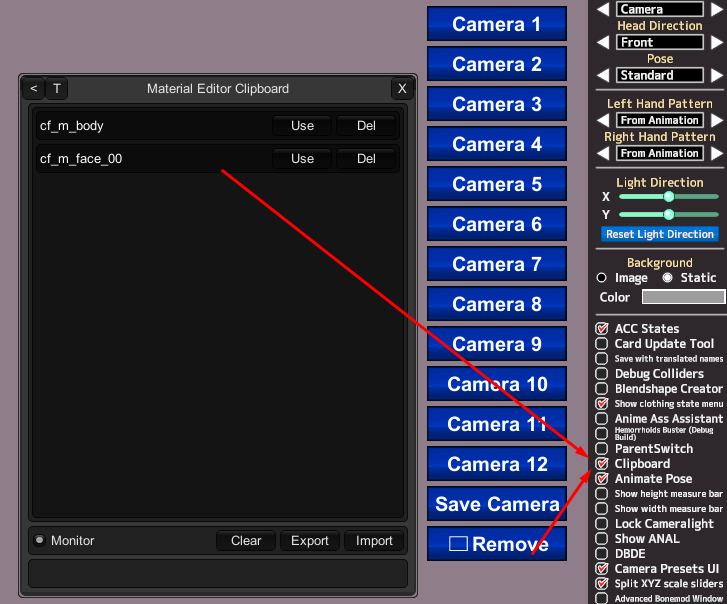
Can copy 2 edits (shaders and sliders shaders), without having to change the models (several times)?

zeidhan29

zeidhan29

KK Master
Joined
Sep 17, 2025
Messages
295
Reaction score
697
Points
93
I was recently looking at some models, and there are configurations within shaders like KKUTS or another shader that seem good to me. My question is if it's possible or if there's a tool that allows me to copy all these settings, both body and head, in one fell swoop. Material Editor only allows you to copy one edit, and it's a hassle to load a character, save it, and go back to the original one to copy other edits.

I would greatly appreciate your help. 😉

Or if what I'm saying is possible with the editor material, please guide me, I'm not aware of the utility of the plugins in their entirety.
 
gustavo40

gustavo40

KK Master
Joined
May 17, 2025
Messages
200
Reaction score
919
Points
93
I was recently looking at some models, and there are configurations within shaders like KKUTS or another shader that seem good to me. My question is if it's possible or if there's a tool that allows me to copy all these settings, both body and head, in one fell swoop. Material Editor only allows you to copy one edit, and it's a hassle to load a character, save it, and go back to the original one to copy other edits.

I would greatly appreciate your help. 😉

Or if what I'm saying is possible with the editor material, please guide me, I'm not aware of the utility of the plugins in their entirety.


MaterialEditorClipboard
 
zeidhan29

zeidhan29

KK Master
Joined
Sep 17, 2025
Messages
295
Reaction score
697
Points
93
First of all, thank you so much for helping me and responding.

This is probably redundant, given how you show it in the screenshot, but is the plugin also available for KKS, or can I use it on that version? It's the version I'm playing. :(
 
S

Stigma

KK Master ❤
Joined
Apr 5, 2025
Messages
392
Reaction score
1,239
Points
93
First of all, thank you so much for helping me and responding.

This is probably redundant, given how you show it in the screenshot, but is the plugin also available for KKS, or can I use it on that version? It's the version I'm playing. :(
Here

I say you should update to the HF Pacth, but considering you have small storage space, maybe try the Light patch
 
zeidhan29

zeidhan29

KK Master
Joined
Sep 17, 2025
Messages
295
Reaction score
697
Points
93
Here

I say you should update to the HF Pacth, but considering you have small storage space, maybe try the Light patch
In fact, I have the latest version of hf patch installed, but from KKS, so it's probably not included in this release. xd

In fact, and reading this carefully, this plugin isn't included, although I find it much more useful and better than the mass shader editor. :/

But that's the least of it, boss.
You really are the hero we all need. Thank you so much for sharing the plugin with me. I really appreciate the gesture. 😎😎😎😎
 
M

Muffy

Well-known Member
Joined
Dec 5, 2024
Messages
39
Reaction score
98
Points
18
You can do this MUCH FASTER and it is much simpler from within the Studio itself. I do it all the time when copying configs around or doing any material changes whatsoever. Still have to do one at a time, but you can just load both characters at once and click between them!

Once I have materials set up the way I like on a particular character in Studio, I export it, then pop that export into the maker to "finalize" it and create a fully usable card.
 
zeidhan29

zeidhan29

KK Master
Joined
Sep 17, 2025
Messages
295
Reaction score
697
Points
93
You can do this MUCH FASTER and it is much simpler from within the Studio itself. I do it all the time when copying configs around or doing any material changes whatsoever. Still have to do one at a time, but you can just load both characters at once and click between them!

Once I have materials set up the way I like on a particular character in Studio, I export it, then pop that export into the maker to "finalize" it and create a fully usable card.
Dude, what you're suggesting is one of the best ways to simplify the work. Perhaps the only thing I'm a little hesitant about is exporting and using Card Image Replacer. Beyond that, your answer is also a very viable option. Although the only drawback is that this also overwrites or adds masks to the initial model that aren't needed (for example, changing the normal map, the normal map detail, or adding an alpha mask, or even importing a texture that's outside the normal resolution). It's the only reason I was looking for a plugin that does "copy edits" en masse without touching the masks.
 
M

Muffy

Well-known Member
Joined
Dec 5, 2024
Messages
39
Reaction score
98
Points
18
For card image replacer, this should still work perfectly fine. I don't use any exported cards for use in the studio because they can have weird issues with missing data, so I always pop 'em into the maker to make a final save, and have a "real" card, if that makes sense. You should be free to alter this card in any way you see fit, it will be treated like any other card.

Various texture maps being replaced when copying is an unfortunate drawback, but it is simple enough to export the maps manually. I have a "foundation" preset I modified from Anna Anon for face/body utilizing particular normalmaps, linemasks, detailmasks, etc. If I am popping this onto another character, it is either to serve as a complete replacement, or to make further modifications easier since all those settings will already be saved and baked into the card when I export it.

Furthermore, I generally don't want whatever texture maps the original card was using anyway as the ones I intend to use are made for the base preset I have configured. There are a few exceptions to this with things like nipples, genitalia, and hair. These are simple enough to export piecemeal and preserve if I intend to keep them.

Linemasks or normals for skin details can also be a bit problematic, but TBH it is easier to just export ALL of these from the game, and then import them via Studio. You can pick whatever you want on the fly and modify it to a much greater extent in Studio than in Maker.

Honestly, the Maker is total trash with how much it gets in your way with trying to make changes. It also not supporting post-processing is a huge negative, because your card WILL look different in the Studio no matter what. I mainly use it just to make the actual body/face and play dress-up simulator for more hours than I'd like to say. But once that is all done, I pop it into Studio to carry out any and all material alterations because it is just sooooo much faster.

One more protip, if you've found creating overlays to be a pain in the ass since you have to "bake" all the stuff you might want into ONE overlay while constantly going back and forth from studio to your image editor, fear no more.

Copy the face and/or body material, then set the copy to some kind of Alpha shader. I generally use MainItemAlphaPlus, but others can provide a slightly different appearance for things like sweat or other fluids. Set the Render Queue to one digit above the original material, and then import your desired overlay. Bam, you now have that overlay on the character, and you can tweak transparency/customambient, etc right there.
You can even make multiple copies and layer several overlays atop one another.

This is what I have done to create some of the characters I have been working on, for example, Rio from Summer Memories. She is a hodgepodge of like 14 different overlays, many of which I severely edited to preserve specific details I wanted to keep without interfering with others.


Q4nBKAW.png


There is a pretty serious drawback to overlaying several times like this via ME: you will end up with textures clipping through meshes. This can be fixed by either throwing in a body alpha mask (to hide those parts entirely) or simply tesselating the clothing a nudge or two so the clipping goes away. The cool thing is, if you export a character like this from the studio, those material copies are preserved. You can then pop that export into maker, and they will still be there.

A real downside to this kind of severe abuse of the ME is it MASSIVELY bloats the size of cards. Do not ever post a card like that, it will piss people off. To make a card prepared in this fashion "release ready" (and to also solve the clipping problem permanently), you would have to bake all the combined overlay textures into a single overlay, to use via the actual overlay plugin. But you can use ME layering and editing to make the fine real-time adjustments, like "oh that looks better with this transparency", or "oh that looks better with this slight change to the tint", etc. This has massively improved the overall workflow of material editing and overlay creation for me. Don't have to just sorta piss in the wind with your image editor.

 
Last edited:
zeidhan29

zeidhan29

KK Master
Joined
Sep 17, 2025
Messages
295
Reaction score
697
Points
93
Para reemplazar imágenes de tarjetas, esto debería seguir funcionando perfectamente bien. No uso ninguna tarjeta exportada para usar en el estudio porque pueden tener problemas extraños con datos faltantes, así que siempre las coloco en el creador para hacer un guardado final y tengo una tarjeta "real", si eso tiene sentido. Deberías tener la libertad de modificar esta tarjeta de la forma que creas conveniente, será tratada como cualquier otra tarjeta.

Reemplazar varios mapas de textura al copiarlos es un inconveniente desafortunado, pero es bastante sencillo exportarlos manualmente. Tengo un ajuste preestablecido de "base" que modifiqué de Anna Anon para rostro/cuerpo utilizando mapas normales, máscaras de línea, máscaras de detalle, etc. particulares. Si lo coloco en otro personaje, es para que sirva como reemplazo completo o para facilitar modificaciones adicionales, ya que todas esas configuraciones ya se guardarán y se incorporarán a la tarjeta cuando la exporte.

Además, generalmente no quiero ningún mapa de textura que estuviera usando la tarjeta original, ya que los que pretendo usar están hechos para el ajuste preestablecido base que he configurado. Hay algunas excepciones a esto con cosas como pezones, genitales y cabello. Son lo suficientemente simples como para exportarlos poco a poco y conservarlos si tengo la intención de conservarlos.

Las máscaras de línea o normales para los detalles del aspecto también pueden ser un poco problemáticas, pero, para ser honesto, es más fácil simplemente exportar TODAS ellas desde el juego y luego importarlas a través de Studio. Puedes elegir lo que quieras sobre la marcha y modificarlo en mucha mayor medida en Studio que en Maker.

Honestamente, el Creador es una basura total por lo mucho que se interpone en tu camino al intentar hacer cambios. Tampoco admite el posprocesamiento, lo cual es un gran inconveniente, porque tu tarjeta se verá diferente en el estudio pase lo que pase. Lo uso principalmente solo para hacer el cuerpo/cara real y jugar al simulador de disfraces durante más horas de las que me gustaría decir. Pero una vez hecho todo eso, lo introduzco en Studio para realizar todas y cada una de las modificaciones del material porque es muchísimo más rápido.

Un consejo más: si has descubierto que crear superposiciones es un fastidio, ya que tienes que "hornear" todo lo que quieras en UNA superposición mientras vas y vienes constantemente del estudio a tu editor de imágenes, no temas más.

Copie el material de la cara y/o el cuerpo, luego configure la copia en algún tipo de sombreador Alfa. Generalmente uso MainItemAlphaPlus, pero otros pueden proporcionar una apariencia ligeramente diferente para cosas como el sudor u otros fluidos. Establezca la cola de renderizado en un dígito por encima del material original y luego importe la superposición deseada. Bam, ahora tienes esa superposición en el personaje y puedes modificar la transparencia/ambiente personalizado, etc. allí mismo.
Incluso puedes hacer varias copias y superponer varias capas una encima de la otra.

Esto es lo que he hecho para crear algunos de los personajes en los que he estado trabajando, por ejemplo, Río de Summer Memories. Ella es una mezcolanza de como 14 superposiciones diferentes, muchas de las cuales edité severamente para preservar detalles específicos que quería conservar sin interferir con los demás.


Q4nBKAW.png


Superponer varias veces de esta manera a través de ME tiene un inconveniente bastante grave: terminarás con texturas que se recortan a través de las mallas. Esto se puede solucionar colocando una máscara alfa en el cuerpo (para ocultar esas partes por completo) o simplemente colocando una o dos capas en la ropa para que el recorte desaparezca. Lo bueno es que si exportas un personaje como este desde el estudio, esas copias materiales se conservan. Luego puedes enviar esa exportación al fabricante y seguirán ahí.

Una verdadera desventaja de este tipo de abuso severo del ME es que aumenta ENORMEMENTE el tamaño de las cartas. Nunca publiques una tarjeta como esa, enojará a la gente. Para que una tarjeta preparada de esta manera esté "lista para su lanzamiento" (y también para resolver el problema de recorte de forma permanente), tendría que hornear todas las texturas de superposición combinadas en una sola superposición, para usarlas a través del complemento de superposición real. Pero puedes usar capas y edición ME para hacer los ajustes finos en tiempo real, como "oh, eso se ve mejor con esta transparencia", o "oh, eso se ve mejor con este ligero cambio en el tinte", etc. Esto ha mejorado enormemente el flujo de trabajo general de edición de material y creación de superposiciones para mí. No tienes que simplemente orinar en el viento con tu editor de imágenes.
I'll tell you something, I really admire how you work and the way you've taken the time to explain things to me, and I totally agree with you. The maker can end up being a real pain in the ass when it comes to transferring the model to the studio because many details are even lost, but seeing how you work and how demanding it can be to use multiple layers in the same material, I'll just say never give up. Although you've currently opted for a more "economical" option, I don't think I've ever used the option of duplicating, tripling, or quintuple layers, since my PC is a toaster. My works are simple and may even end up being ugly in other people's eyes, but my point is that if you manage to get the desired results even when it's not the method you usually use, it's still a victory. (I just wanted to copy shaders and sliders - no mask- of head and body without having to open my notepad.)
 
M

Muffy

Well-known Member
Joined
Dec 5, 2024
Messages
39
Reaction score
98
Points
18
Honestly, something which thoroughly impresses me about Studio is how so much shit that shouldn't work just works. It is basically Blender Lite. Material Editor is pretty much shader nodes plucked right from Blender, the only difference is it's jank as all fucking hell. Like, you're telling me if I set this particular object to this specific render queue, it shows eyebrows through it, but if I use this other object, give it the same settings, it doesn't work? Why? It's jank. Animating is also extremely funny to me. The in-game rigs SUCK so some insane gooner wrote a plugin just to let you parent any of the bajillion unusable bones in IK to a folder so you can animate the folder. NodeConstraints is literally creating an IK rig...using an IK rig which already exists.

But yes! Toaster or not, you gotta work around the weird ass quirks of the Studio. It was never meant to work with the things BetterRepack enable it with. There are so many weird little things you just have to get used to. Like, would it be nice to copy outfits without them fucking up every god damn accessory, even when I tell it DONT copy the fucking accessories? YES. That would be GREAT. How do you get around this? By spending way too much time isolating each outfit into constituent parts of accessories only, and clothes only, and importing one at a time.
 
LordBubnub

LordBubnub

Active Member
Joined
Oct 9, 2025
Messages
57
Reaction score
52
Points
18
But yes! Toaster or not, you gotta work around the weird ass quirks of the Studio. It was never meant to work with the things BetterRepack enable it with. There are so many weird little things you just have to get used to. Like, would it be nice to copy outfits without them fucking up every god damn accessory, even when I tell it DONT copy the fucking accessories? YES. That would be GREAT. How do you get around this? By spending way too much time isolating each outfit into constituent parts of accessories only, and clothes only, and importing one at a time.

Hi, this is completely unrelated to the title of the forum. But I also have this problem with accessories. In the character maker, I have a hard time getting the clothes and accessories in an outfit and giving it to another character. What do you mean when you say, "isolating each outfit into constituent parts of accessories only, and clothes only, and importing one at a time." I'm actually new to the whole program so I don't know how copy outfits along with all the accessories properly.
 
M

Muffy

Well-known Member
Joined
Dec 5, 2024
Messages
39
Reaction score
98
Points
18
Hi, this is completely unrelated to the title of the forum. But I also have this problem with accessories. In the character maker, I have a hard time getting the clothes and accessories in an outfit and giving it to another character. What do you mean when you say, "isolating each outfit into constituent parts of accessories only, and clothes only, and importing one at a time." I'm actually new to the whole program so I don't know how copy outfits along with all the accessories properly.
Suppose I have two characters, and both are using accessory hairs. Let's say I want the accessory hairstyles from one particular character's outfits on the second character, but ONLY the hair.

What I usually have to do is go to the first character's outfits and remove everything BUT the hair, and save each as a clothing coordinate. This effectively saves the accessory hairstyle as a loadable piece of clothing.

Next, I load up the character which is going to receive the hair. I delete all of the hair accessories they are using, but keep the rest of the outfit intact and save those as their own clothing coordinates. This allows me to have an "unfuck" button for the next steps.

With the hair accessories removed from the character, I can then load the desired hair coordinate onto the character. If it fails or fucks up in some way, I can just load up the hairless outfit and try it again.

Additionally, many accessory hairstyles are not made to some kind of standard. So like, one character card might put all the hair items on slots 30-60. But another might have all of the hair accessories randomly dispersed throughout all slots.

What I do for my cards is optimize this layout before saving a purely clothes or purely hair coordinate, and shove all the hair accessories either at the very top of the list, or somewhere in the 30-50 range. So on a hairstyle I'm looking to save and re-use on other cards, I will use the "Transfer" feature to move and compress all of those hair accessories into those slots.

For the character on the receiving end of the transplant, I will move and compress all of the NON-HAIR accessories so they are outside of this range. This way, there are no conflicts when merging the hair coordinate onto it.

This process is still WILDLY finicky, but if you save coordinates of the hair all by itself, and save a coordinate of the clothes/NON-HAIR accessories you want to merge them with, you at least save a lot of time if it screws up since you can just load back to a hairless card with the outfit you want.

Sometimes, this process just doesn't fricking work at all no matter how much I fuck with it. In these situations, I actually just make two copies of the character in Studio and put them in the same exact pose. One character has a hidden body (done by unchecking the body renderer in material editor), the copy however has everything BUT body disabled.

The end result of this is I can now load the hair accessory coordinate which royally fucks up the rest of the outfit on the head-only character, and simply turn off/hide all the clothing and hide their body, and the body character remains intact with the outfit, minus the hair since their whole face is disabled and accessories are turned off.

This of course is janky as all hell, but it does work. To make posing this kind of frankenstein easier, I parent both characters head and neck nodes to one another in NodeConstraints, so any head movements of the body character will translate 1:1 on the head only character.
 
LordBubnub

LordBubnub

Active Member
Joined
Oct 9, 2025
Messages
57
Reaction score
52
Points
18
What I usually have to do is go to the first character's outfits and remove everything BUT the hair, and save each as a clothing coordinate. This effectively saves the accessory hairstyle as a loadable piece of clothing.

Next, I load up the character which is going to receive the hair. I delete all of the hair accessories they are using, but keep the rest of the outfit intact and save those as their own clothing coordinates. This allows me to have an "unfuck" button for the next steps.

With the hair accessories removed from the character, I can then load the desired hair coordinate onto the character. If it fails or fucks up in some way, I can just load up the hairless outfit and try it again.

Additionally, many accessory hairstyles are not made to some kind of standard. So like, one character card might put all the hair items on slots 30-60. But another might have all of the hair accessories randomly dispersed throughout all slots.

What I do for my cards is optimize this layout before saving a purely clothes or purely hair coordinate, and shove all the hair accessories either at the very top of the list, or somewhere in the 30-50 range. So on a hairstyle I'm looking to save and re-use on other cards, I will use the "Transfer" feature to move and compress all of those hair accessories into those slots.

That is a brilliant work around that I can replicate. I can only hope that ScrewThisNoise and other mod makers create plugins in the future where this multiple step process is significantly reduced. I wish there was a massive tutorial page for this software coz you're right, this is basically blender lite, and it's so hard to find information on what to do to make this easier.

But hey Muffy, thanks for explaining this. Much appreciated man 👊
 
M

Muffy

Well-known Member
Joined
Dec 5, 2024
Messages
39
Reaction score
98
Points
18
That is a brilliant work around that I can replicate. I can only hope that ScrewThisNoise and other mod makers create plugins in the future where this multiple step process is significantly reduced. I wish there was a massive tutorial page for this software coz you're right, this is basically blender lite, and it's so hard to find information on what to do to make this easier.

But hey Muffy, thanks for explaining this. Much appreciated man 👊
Honestly, I think this is just an inherent issue with how KK reads character data and I don't think much of anything can be done to fix it. I believe the reason loading particular outfits straight up fucks the entire character up is because one or both of those cards contain data that just gets lost in translation somehow.

For example, I have a specific gyaru-styled bra I have painstakingly created texture maps and a modular PSD for because all the in-maker patterns are awfully low-res. I can make the pattern look like whatever I want, color it however I want, etc and save it right there. However, if I merge this bra onto ANY outfit which uses a "Jacket Type" top with specific configurations to have only a shirt and tie with some material tweaks, the shirt reverts to the default and all material changes are reset.

I have loaded numerous clothing coordinates which miraculously worked, and allowed me to fully complete one "frankenstein" outfit slot, just for a previous one I have fully finished to suddenly have eyeglasses where a vital hair accessory was, or pom-poms where there was once a scrunchie. It is SO bizarre, and I save after almost every single successful merge for this very reason.

Why did this previously functional outfit suddenly fucking break itself while I was importing data on a completely different outfit? I don't know, but I think it's just ~KK~ things. It is also possible this is a known bug with specific accessory plugins, and it's possible there may be a fix one day, but on the other hand it took like 7 years for "disable New Dynamic Bones" to be a thing with bone colliders, so I doubt this will ever happen. We can't even use keyboard shortcuts to copy and paste KKPE bone variables. There aren't even shortcuts for updating NodeConstraints bone data! I am surprised nobody has attempted to make these more streamlined to use, because good lord tweaking a NodeConstraints rig for a different character is TEDIOUS AS HELL.

I have noticed these issues don't occur when loading clothing directly from a CHARACTER rather than a clothing coordinate. So like, in the Maker, you can just checkbox "load clothing" when loading a character, and you'll load all that character's outfits at once. If I want clothes and body accessories from Outfit 1 on Character 1 to be with hairstyle and Outfit 1 on Character 2, I just make two versions of that character in Maker: one version with the right hair and wrong clothes, another with the wrong hair but right clothes. I then utilize them with the body/head trick in Studio.
 
Last edited:
I

Iwant

New member
Joined
Aug 31, 2025
Messages
21
Reaction score
2
Points
3
For card image replacer, this should still work perfectly fine. I don't use any exported cards for use in the studio because they can have weird issues with missing data, so I always pop 'em into the maker to make a final save, and have a "real" card, if that makes sense. You should be free to alter this card in any way you see fit, it will be treated like any other card.

Various texture maps being replaced when copying is an unfortunate drawback, but it is simple enough to export the maps manually. I have a "foundation" preset I modified from Anna Anon for face/body utilizing particular normalmaps, linemasks, detailmasks, etc. If I am popping this onto another character, it is either to serve as a complete replacement, or to make further modifications easier since all those settings will already be saved and baked into the card when I export it.

Furthermore, I generally don't want whatever texture maps the original card was using anyway as the ones I intend to use are made for the base preset I have configured. There are a few exceptions to this with things like nipples, genitalia, and hair. These are simple enough to export piecemeal and preserve if I intend to keep them.

Linemasks or normals for skin details can also be a bit problematic, but TBH it is easier to just export ALL of these from the game, and then import them via Studio. You can pick whatever you want on the fly and modify it to a much greater extent in Studio than in Maker.

Honestly, the Maker is total trash with how much it gets in your way with trying to make changes. It also not supporting post-processing is a huge negative, because your card WILL look different in the Studio no matter what. I mainly use it just to make the actual body/face and play dress-up simulator for more hours than I'd like to say. But once that is all done, I pop it into Studio to carry out any and all material alterations because it is just sooooo much faster.

One more protip, if you've found creating overlays to be a pain in the ass since you have to "bake" all the stuff you might want into ONE overlay while constantly going back and forth from studio to your image editor, fear no more.

Copy the face and/or body material, then set the copy to some kind of Alpha shader. I generally use MainItemAlphaPlus, but others can provide a slightly different appearance for things like sweat or other fluids. Set the Render Queue to one digit above the original material, and then import your desired overlay. Bam, you now have that overlay on the character, and you can tweak transparency/customambient, etc right there.
You can even make multiple copies and layer several overlays atop one another.

This is what I have done to create some of the characters I have been working on, for example, Rio from Summer Memories. She is a hodgepodge of like 14 different overlays, many of which I severely edited to preserve specific details I wanted to keep without interfering with others.


Q4nBKAW.png


There is a pretty serious drawback to overlaying several times like this via ME: you will end up with textures clipping through meshes. This can be fixed by either throwing in a body alpha mask (to hide those parts entirely) or simply tesselating the clothing a nudge or two so the clipping goes away. The cool thing is, if you export a character like this from the studio, those material copies are preserved. You can then pop that export into maker, and they will still be there.

A real downside to this kind of severe abuse of the ME is it MASSIVELY bloats the size of cards. Do not ever post a card like that, it will piss people off. To make a card prepared in this fashion "release ready" (and to also solve the clipping problem permanently), you would have to bake all the combined overlay textures into a single overlay, to use via the actual overlay plugin. But you can use ME layering and editing to make the fine real-time adjustments, like "oh that looks better with this transparency", or "oh that looks better with this slight change to the tint", etc. This has massively improved the overall workflow of material editing and overlay creation for me. Don't have to just sorta piss in the wind with your image editor.
Offtopic but is the card you used here as an example yours? If so, is it for share?
 
Top