Character Help with a char's thigh looking odd

Sera

Sera

Senior Member
Joined
Mar 12, 2026
Messages
68
Reaction score
170
Points
33
Credits
1,895
Hi guys, Im modifying this Rin card, but her thighs looks somewhat odd, as if its slightly bulging forward.
Is it just me, or is there actually something thats done towards the body slider that causes this? I've tried playing around the sliders to fix this, but I can't seem to find the cause.
4UJtuEG.png

Card Link : Gofile
 
Sera

Sera

Senior Member
Joined
Mar 12, 2026
Messages
68
Reaction score
170
Points
33
Credits
1,895
To be specific, its this part that looks off to me, as if its slight protuding forward

aSPwMQO.png

It looks much more noticable in game
 
Last edited:
trpotat22

trpotat22

Veteran Member
Joined
Dec 27, 2025
Messages
54
Reaction score
571
Points
83
Credits
6,410
I'm not sure, do you use the bonemod editor (Advanced Bones Slider)?
When you work on the body proportions I suggest to work with the default sliders first, then bonemod stuff later since it does work in a different way sometimes and can make stuff look ugly if you just keep the default values of the default sliders and try to do everything through the bonemod editor (weird stretching or angles).

Im modifying this Rin card
If that's someone else card with already applied custom body proportions stuff then it's probably the best to just reset everything and then start from scratch.

If you want just post the card here and I'll take a look at.
Also post the image reference showing what exactly you want to achieve.
 
Last edited:
Sera

Sera

Senior Member
Joined
Mar 12, 2026
Messages
68
Reaction score
170
Points
33
Credits
1,895
I'm not sure, do you use the bonemod editor (Advanced Bones Slider)?
When you work on the body proportions I suggest to work with the default sliders first, then bonemod stuff later since it does work in a different way sometimes and can make stuff look ugly if you just keep the default values of the default sliders and try to do everything through the bonemod editor (weird stretching or angles).


If that's someone else card with already applied custom body proportions stuff then it's probably the best to just reset everything and then start from scratch.

If you want just post the card here and I'll take a look at.
Also post the image reference showing what exactly you want to achieve.
I put the card link below the picture, apologies as it becomes easily unnoticed.
Card Link : Gofile
I have no experience in modyfing the bonemod of characters. I mostly play with the body sliders, however in this case, I transferred another body of a Rin card I modified, onto this new one.
I thought this Rin card looked nicer (Resembles her vanilla look more). After transferring the body and body_bonemod, I tweaked a few sliders here n there, then realized the thighs looked odd.
How does one access the body_bonemod of the char?

(Sorry Im rather new to Koikatsu in general so Ive only been doing basic modifications to cards)
 
trpotat22

trpotat22

Veteran Member
Joined
Dec 27, 2025
Messages
54
Reaction score
571
Points
83
Credits
6,410
I put the card link below the picture, apologies as it becomes easily unnoticed.
That's on me actually, I really missed it there.
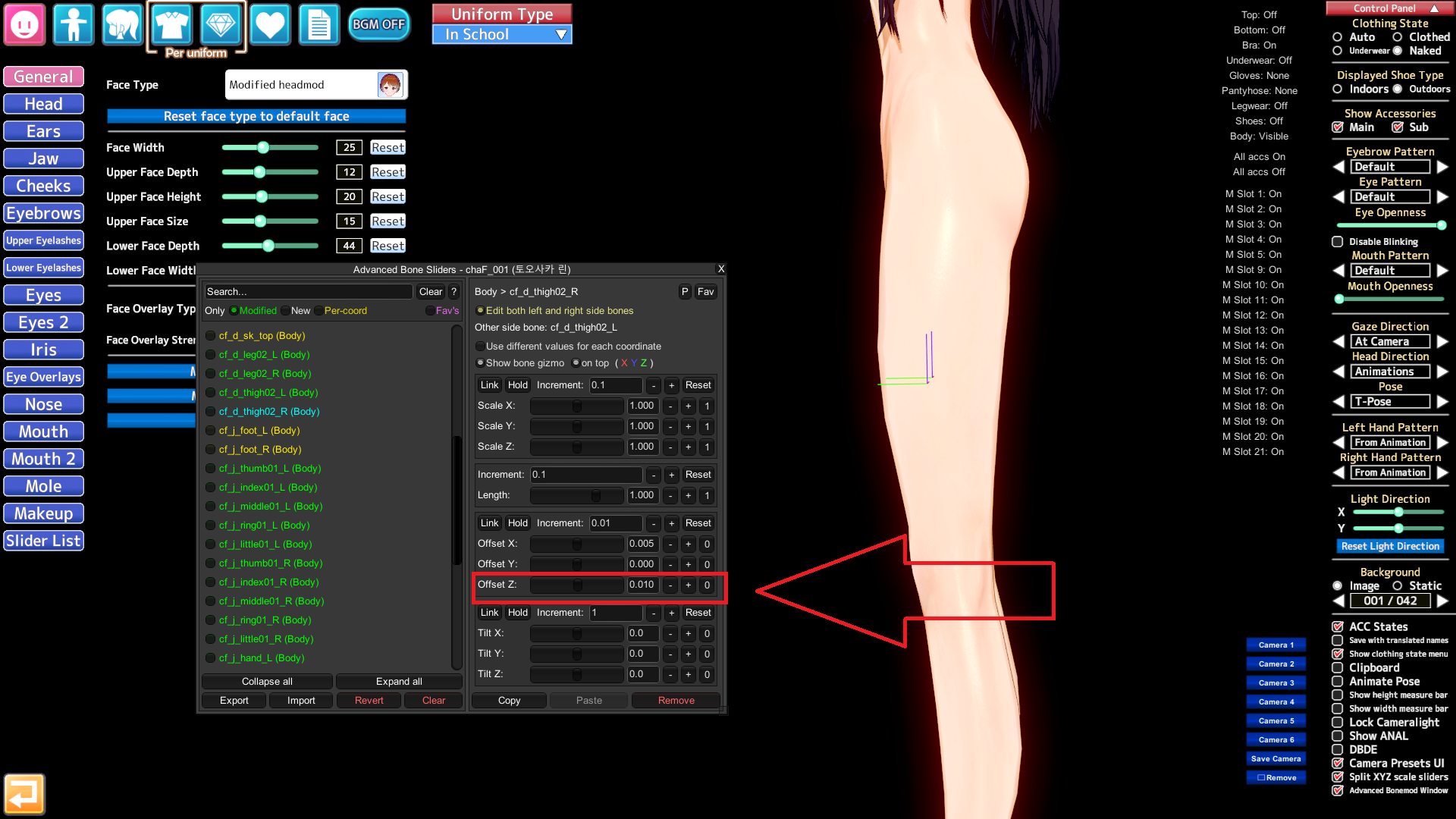
ZBX0n.png

It it as I thought, so the issue related to the bones
It's cf_d_thigh02
Set that marked one to 0.0, it will fix the issue

How does one access the body_bonemod of the char?
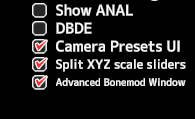
If you have the HF Patch installed (the last version) then it should be there in the right bottom corner:

ZBXOM.png
 
Last edited:
Sera

Sera

Senior Member
Joined
Mar 12, 2026
Messages
68
Reaction score
170
Points
33
Credits
1,895
That's on me actually, I really missed it there.
ZBX0n.png

It it as I thought, so the issue related to the bones
It's cf_d_thigh02
Set that marked one to 0.0, it will fix the issue


If you have the HF Patch installed (the last version) then it should be there in the right bottom corner:

ZBXOM.png
I see! Big thanks for the advice, appreciate it! : D
 
Top
これは閲覧専用の自動翻訳ページです。返信・検索・ログインなどの操作は、オリジナルの英語版サイトへ移動してください。 英語版で開く (Open in English) ×