
pineapple_pizza
Senior Member
Yeah I have Subaru but not Rintarou same as Tino Shade https://gofile.io/d/gJpey9u got subaru and rintaro from fragnance flower and Tino shade?

Yeah I have Subaru but not Rintarou same as Tino Shade https://gofile.io/d/gJpey9u got subaru and rintaro from fragnance flower and Tino shade?

thoghtht of making marriage scene with him with waruko kaguri but anyway thanksYeah I have Subaru but not Rintarou same as Tino Shade https://gofile.io/d/gJpey9

Thankyou verymuch! been looking for kazu cards for so long. i legit want to ask for more xD but ill gladly accept whatever u gave usYeah I have Subaru but not Rintarou same as Tino Shade https://gofile.io/d/gJpey9
Could you tell me who the creator of scene #110 is?Kiaps https://www.pixiv.net/en/users/55964981 archive https://gofile.io/d/7SinC4 excuse my laziness lol
And as a treat 😊
#110 https://gofile.io/d/ROi3qP

can anyone reupload this agian?
哲_随便观
做之前说挺简单()结果肩膀又失败了我真的搞不懂…… 头模就不做了直接挪一下的https://www.pixiv.net/en/artworks/110993487的 fanbox: https://wssb.fanbox.cc/posts/10906823 patreon: htwww.pixiv.net
Wise from OoOoO (Lor):

Gofile - Cloud Storage Made Simple
Secure, fast and free cloud storage solution. Upload and share files instantly.gofile.io
RokuCould you tell me who the creator of scene #110 is?

Bro, your head shape references are wrong, you have been lied and bamboozled.I originally intended to just answer your questions but I ended up writing a whole ass guide explaining how I approach making character cards so I'll briefly address your first question here and you can read the guide below for more in-depth explanations.
By copying the slider values of the reference cards into my edited one, for example, I like the eyes of card A, and the head shape of card B, so I copy the slider values of the eyes of card A and the slider values of the head of card B and put them into one. The result won't look good if you blindly copy the sliders however, you'll inevitable have to make adjustments from observation and that's where you make use of your other references. A good example of this is my version B of the Mekami Shifty card, I copied the values of the head shape from Upiuu's Mast card because I felt like it resembled the source material very closely, and once I did that I adjusted everything else accordingly.
An important lesson you learn when studying figure drawing is to work from the biggest shapes down to the smallest, starting with the general shape of the head before moving on to the features of the face within it.
In Koikatsu this means starting with the head scale X, Y, and Z sliders, then continuing with the ears, jaw and cheeks sliders, I know that the sheer amount of sliders can be daunting but keep in mind that you can always go back and fine tune them, at this point of the process you're not supposed to be concerned with the details of the face, we're trying to get a satisfying head shape to work on as a foundation, think of it as sculpting a head with clay, you don't start with the smaller features of the face like the eyes or the nose.
Since your references are also 3d models this part shouldn't be that complicated, just make sure to angle the head of your model to match the same angles from your references and switch between them from time to time to get as close as possible. If you have a card that has a similar shape of the head you can copy the slider values from it to save yourself some time and work from there, the card doesn't have to be exactly the same as the one you are trying to match, it could even be from a completely different character as long as it has a head shape that you feel can help you get closer to the final result, otherwise you can make the head from scratch by observation, just take your time and work on the sliders one by one.
Once you're satisfied with the head shape you should start laying out the face by roughly measuring where each feature sits in the model you're trying to match, the sliders I move at this point are eye, eyebrow, nose, and mouth vertical position, as well as eye height, width, and spacing, don't concern yourself with the shape or details of the features just yet, we are laying out where each feature sits, not their specific form. Having basic anatomical knowledge helps; the eyes sit roughly at the middle point between the top of the head and the tip of the chin and are about one eye apart in width, the base of the nose sits at the middle point from the tip of the chin and the center line of the eyes, etc. I'm aware that waifus do not look like real humans most of the time but in my opinion these are still good guidelines if you find yourself having trouble placing the features of the face, and if you look at my Chun-Li card and P.Jackson's Mai these rules still apply despite how stylistically different they are from real life.
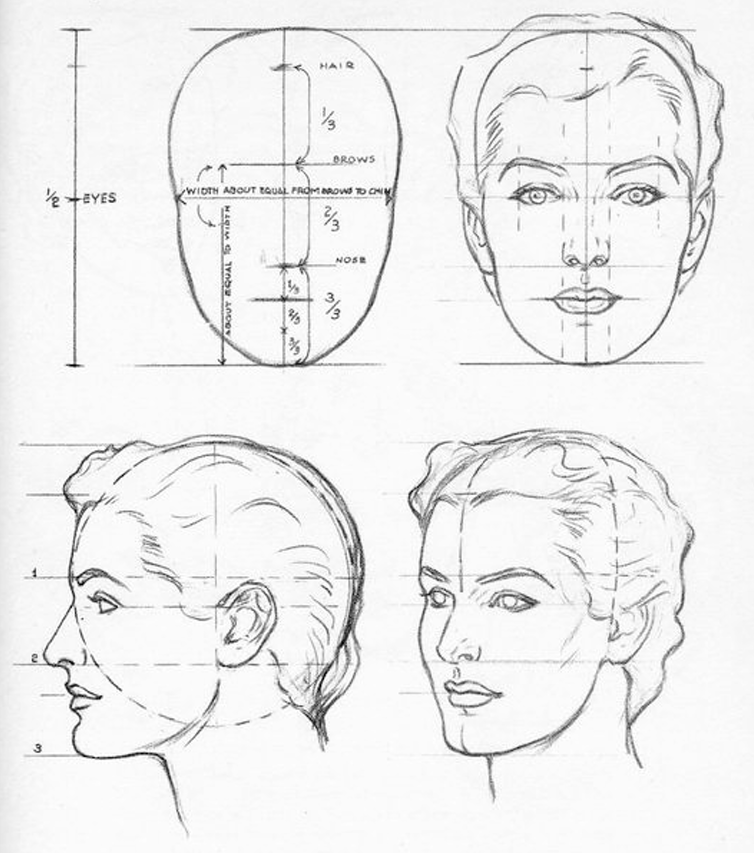
From Andrew Loomis' Drawing the Head and Hands
Lastly we concern ourselves with the features of the face as well as other character specific details, I usually start with the easier ones like mouth width and angle, eyebrow shape and spacing, and leave the eyes for last since they tend be the trickiest to get right, first with the eye rotation slider to get a basic idea of the shape, then the eye lid sliders, inner and outer eye corner height sliders and finally the upper and lower eyelash sliders, I personally don't change the eyeball scale sliders at all since I find the previous options robust enough to get the desired shape but feel free to mess around with them if you wish, additionally don't forget to play around with the iris shape and vertical position sliders as well, since a slight adjustment of the iris can make or break the appearance of the eye from my experience. Regarding character specific details, these are the unique facial features of the character you're trying to match, for example, going back to my Chun-Li card, it was important to get the eyebrows and red makeup right since these are iconic details of the character to me, this just comes down to looking at the list of face feature types in your game and find the ones that look the closest to your reference (or you could draw them in photoshop or any other raster graphics software but this guide is already long enough so I won't cover material editor and overlay stuff here lol). Ask yourself what are the details of the card you're trying to match that stand out the most, it could be the makeup, eye color, eyebrow shape, a mole, etc.

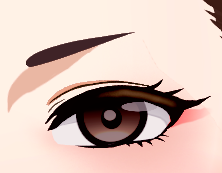
Chun-Li 3rd Strike portrait on the left, my card on the right
To summarize, start with the largest shapes first (the shape of the head, jaw, and chin),then lay out where each feature of the face sits inside the head by measuring your reference (eye, mouth, and nose vertical position and spacing),lastly work on the smallest details like eye and iris shapes and don't forget to get the character defining features like makeup or eye color. If you give yourself some structure in your work process you won't get overwhelmed by the vast sea of sliders that the character maker has.
Some closing thoughts
From personal experience it's very easy to get tunnel vision and get frustrated from not getting a specific detail right, I've read of artists dealing with this by looking at their work through a mirror, flipping their canvas upside down or looking at their work from a really far away distance, I find these pretty useful when I'm stuck but if they don't work for you just take a small break and you'll be just fine.
I also recommend saving your character multiple times as you work on it because if you feel like you messed something up and don't remember which sliders you moved you can always go back to a previous version of your character and work from there, for example I saved the Mekami Shifty card I posted like 7 times, each with a slightly different face, because I couldn't decide which one to keep working on, and even after I posted it I made another version lol, make as many copies as you can and don't be afraid to mess around with them.
I hope this guide helps you or anyone else trying to make character cards, thanks for reading till the end.
maybe

I mean sure thing https://gofile.io/d/btl91A here's all makeine characters from kazuThankyou verymuch! been looking for kazu cards for so long. i legit want to ask for more xD but ill gladly accept whatever u gave us
Really thankful for ur kazu cards contribute, do u perhaps have the shinujji family sisters?I mean sure thing https://gofile.io/d/btl91A here's all makeine characters from kazu

it has three mods it needs but i don't know if it needs any otherCould you please share it?
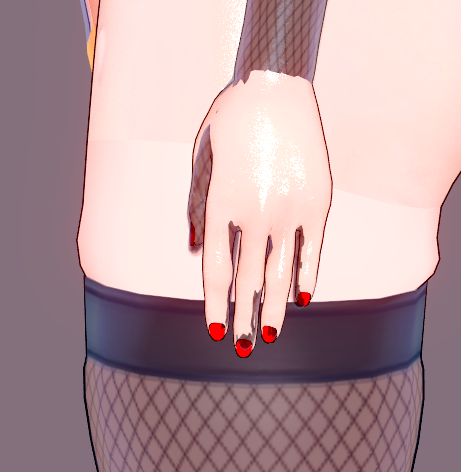
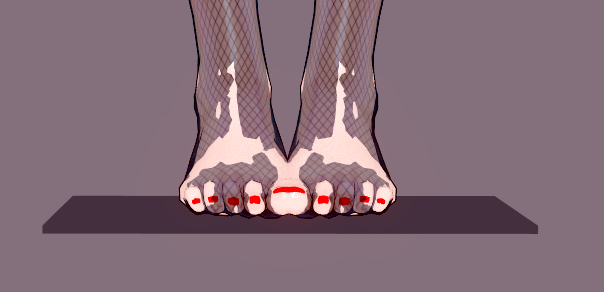
Change the body uncensor selector, You are using BetterHandsFeet, but this is not compatible with many gloves and stockings.What is causing this, and how can I fix it?

Not yet, I do plan on buying them soon I'll share when I do soReally thankful for ur kazu cards contribute, do u perhaps have the shinujji family sisters?
Can u share this card? I want that feet.What is causing this, and how can I fix it?
Downloaded my files and extracted them. They´re fine.There are CRC error in the rar ? Or it's the problem of gofile ?
i think u must change body type to Clit/profundius/innie or roaste, there is a new body shape that makes everyhand and leg likekinda okish where non of the current gloves or stocking will work so it will just makeit like that, i still dont know how i got that body type myselfWhat is causing this, and how can I fix it?


doyou have velvet card?Here's the Velvet's mod, not sure about the other one cause that's literally template stuff, I think.
 www.pixiv.net www.pixiv.net
 You can find the Flora one here in @T3los' postHello again, once again im asking if anyone has this card from
envenenad0
[R-18]Camille - Project QT
Camille from Project QT character Created in BetterRepack RX20 Card: https://envenenado.gumroad.com/l/tugttx Enjoy :)
[R-18][Rework] Flora - Project QT
Flora from Project QT character - The first card I published, what memories Created in BetterRepack RX20 - card: https://envenenado.
www.pixiv.net 
No, I don't.doyou have velvet card?

「コイカツ」 鬼方カヨコ v.2 ● ARCHIVED
ブルアカでは珍しいの18歳 Rare 18 y/o character in Blue Archive 蔚蓝档案中罕见的18岁角色 ---------------------------------------------------------------------
does anyone still have this card from makisu?
hi, anyone know who made this scnene ?
I remember, that was his username!Wasn't that person's name “I Just Wanna Name”?
I think that's right...


are the scene animated? or just staticI remember, that was his username!
I actually downloaded a bunch of his scenes a while ago since the he did very good timeline scenes.
Not sure if I got them all, probably not... but here you go:
7.56gb compressed to 487mb of I Just Wanna Name scenes: (317 scenes in total)
https://gofile.io/d/FMoxjf <<<--- Unprotected link for bots, normal people, chinese and people who like bots a little too much, enjoy!
Note: If you cant extract this archive, update your winrar -> https://winrar.es/descargas
As far as I know, Nina and Minami from TS Mahou Shoujo series don't have cards with their corruption outfit. And Exstia series only have their cards that are about Exstia 3 by whatitis. Still looking for NYH's Lovemary cards and whatisit's Vanishing Reality card these days, hope I can find them.Man, so true... Ended up editing my own cards for this series due to most authors not making any. 😔
Thanks!Loading…
gofile.io
can anyone reupload this agian?
www.pixiv.net www.pixiv.net www.pixiv.net 
What is causing this, and how can I fix it?
I'm also looking to fix the broken socks issue, so it should help you out as well.


