[ILLUSION] Koikatu! - Questions & General Discussion Thread

B

buruuburu

New member
Joined
Feb 2, 2025
Messages
12
Reaction score
2
Points
3
I have chara studio drop frames in a lot of scenes and some even lag the whole computer for me while it's loading, and when it loads it goes to 5fps or something. Most ettole scenes for example are very laggy and I don't know how to fix it. I don't have a bad pc since I can run new games comfortably. Any way to make this better? I like ettole but the scenes are way too laggy...
 
G

Guardian

Active Member
Joined
Jun 6, 2025
Messages
229
Reaction score
49
Points
28
Dont know if anyone knows what happen, i assume is because i'm running this scene in KK and not in KKS but this happen in a sugardust scene. When i play it in KK, this happen with the dick but in KKS, this problem is not happen. Is there any way to to solve this problem and running it on KK?
first image is in KK, second in KKS
pwpLsjj.png

iR5gM9t.png
Bit off topic, but mind if I know which scene that is?
(Also, I'd try looking at the nodes to see if they are properly working/turning off and on.)
 
G

Guardian

Active Member
Joined
Jun 6, 2025
Messages
229
Reaction score
49
Points
28
Tried asking in the discord, but havn't quite found a solution yet so I might as well ask here.

Does anyone know how to change colors on loaded textures? The ones I'm using as of now are being forced to be certain colors and after going a bit on the discord, they said to import a red texture to the color mask, but I can't seem to find which one I'm supposed to import it too, the closest I got was with the emission mask but it caused the texture to only change colors between black and red (the color I imported).
 
White_Runner

White_Runner

Senior Member
Joined
Sep 13, 2025
Messages
51
Reaction score
173
Points
33
Tried asking in the discord, but havn't quite found a solution yet so I might as well ask here.

Does anyone know how to change colors on loaded textures? The ones I'm using as of now are being forced to be certain colors and after going a bit on the discord, they said to import a red texture to the color mask, but I can't seem to find which one I'm supposed to import it too, the closest I got was with the emission mask but it caused the texture to only change colors between black and red (the color I imported).
What Im going to do works for hair accesories, but might help you get a feel of how things work in the koikatsu editor for clothes and hair too.
You are going to need an image editor but for this test case ill use Photopea (which is free).
First, load the character and identify the item you want to change. (Accessory/clothes).
1) Identify the accesory you want to change textures. In this case I want to change Seele´s hair.
yKaZYGa.jpeg


2) To identify the accesory, hover your mouse over the accesory in the list, the accesory will turn green.
BW6s3ak.jpeg


3) Click on Material Editor, take note on the multiple sub-accesories. You can toggle them.
0kGNAnf.jpeg


4) Then, you must find the Main texture of whatever you want to change, and export said texture. The texture will be saved to your game folder.
6N3VIXt.jpeg


5) Modify the texture, save it, load it.
MDOI3SV.png

JLihuIW.png

5kckK4C.jpeg


Final examples where I:
-Replaced eye overlays (some eyes bug and you have to manually change their textures).
-Added tesselation for skin (KKUTS) and KKUTS hair for its nails.
-Added blush overlay over the face (when it doesnt work, you must change the main texture and place overlay over it lol [Znany cards]), etc.

YLjvZin.png

kFUWieb.png

xLQIcgF.png

ULFYsgy.png

YeQHXMl.png

8SuX6t1.png
 
H

henman7569

Member
Joined
Aug 12, 2025
Messages
19
Reaction score
20
Points
3
Does the timeline vmd sync plugin not work for anyone? It used to work on my old version but the new one(RX22) I downloaded doesn't seem to work despite the plugin being there.
 
B

bkbrst

New member
Joined
Jul 21, 2025
Messages
4
Reaction score
3
Points
3
Hi, how can I fix things like these?
0TwmQeD.png

DjSzeBS.png

kIifqQc.png
 
gustavo40

gustavo40

KK Master
Joined
May 17, 2025
Messages
203
Reaction score
923
Points
93
Does anyone know why the self shadow looks like this?


White_Runner

White_Runner

Senior Member
Joined
Sep 13, 2025
Messages
51
Reaction score
173
Points
33
Does anyone know why the self shadow looks like this?


Not completely sure but its probably a configuration of the skin of your character.
Ill make an example on what you have to do, however, Its not a certain fix cause there are too many variables on each character.

1) Learn about Material Editor (Face/Body):
YeukvEn.png


2) Click on Material Editor (Body/Face)
3MeeKhI.jpeg


3)Then scroll down on material editor (Body/Face), find the bugged option and change it to fix the character, this might take a while (for you).
aEMwIuZ.png

HkdlXuB.png

WeWb3yD.png


Final result:
ABeJIjd.png
 
White_Runner

White_Runner

Senior Member
Joined
Sep 13, 2025
Messages
51
Reaction score
173
Points
33
I have chara studio drop frames in a lot of scenes and some even lag the whole computer for me while it's loading, and when it loads it goes to 5fps or something. Most ettole scenes for example are very laggy and I don't know how to fix it. I don't have a bad pc since I can run new games comfortably. Any way to make this better? I like ettole but the scenes are way too laggy...
Things that lower fps on Koikatsu editor:
Lights.
Reflections.
Lots of objects.
Tesselation of characters.

How to fix:
1) Buy Nasa PC.

2) Remove objects, lights, characters, effects from your scene.

3) Change antialising settings.
5jnHrvN.jpeg


4) If you can, try Lossless Scaling and X5 framegen the fuck out of it.
For this, either set the fps target to your monitor max refresh rate or just try to guess which multiplier to use. 2X, 3X are good.
This are good for animated scenes.
rdtxoLr.png

I recommend this app because while it introduces input lag, Koikatsu isnt a competitive game lmao (for now) so you will not feel it that much.
Dont forget to disable discord overlay, that kills framegen.
Yes, its compatible with koikatsu on windowed mode (ALT+ENTER)


5) Try to change Nvidia/AMD Panel settings for Koikatsu, personally I set the option "Energy Mode" to "Prefer Maximum Performance".
PrBt72s.png


6) You can try ReShade too, yes its compatible with Koikatsu (PRESS START BUTTON), but personally I didnt find an improvement on AA.
Might want to search for an specific shader, but this needs testing. Its a working idea tho.
XZ0uJnk.png
 
G

gawk1580

New member
Joined
Sep 16, 2025
Messages
3
Reaction score
1
Points
1
Hey folks, I'm having trouble with a YOurWaifu NTR-ed scene. For this particular scene, I have yet to encounter issues with others, as soon as I start the scene via timeline objects disappears and the animations for males stop working with only female movement. However, if I reload the scene and maintain the same timestamp in timeline, the scene is just fine until I start the timeline again. Any input will help.
Here is the SD:
Here is what happens when you play the timeline.
0bwJWNr.jpeg


Here is before starting the timeline
GLqhAij.jpeg
 
Last edited:
A

amaoto

Member
Joined
Nov 17, 2024
Messages
23
Reaction score
20
Points
3
I have chara studio drop frames in a lot of scenes and some even lag the whole computer for me while it's loading, and when it loads it goes to 5fps or something. Most ettole scenes for example are very laggy and I don't know how to fix it. I don't have a bad pc since I can run new games comfortably. Any way to make this better? I like ettole but the scenes are way too laggy...
As someone who had somewhat meh gpu (RX 560) compared to those running KK Studio in their RTX4090s, from my experience, the heavy stuff are these things:
  • Textures having tessellation (usually the body or head). My RX 560 simply cannot handle these scenes, causing my GPU to crash, probably from out of VRAM.
  • Water objects
  • mirror objects or any reflection objects
  • The fking 4K FOV cameras or any FOV cameras. Why the fk are they using 4K FOV60 connected on a tiny monitor like phone objects.
  • Depth of field
  • character accessories (Pecorine hair and Rapi hair are among the memorable ones, though having too many acc is also a fault)
  • Too many character accessories or them having having 4K textures on every damn thing.
  • Scenes using 50MB+ characters.
  • Scene makers making items that cause the scene size to go out of whack.
  • Or just simply having too many characters in a scene.
One I know is a Poison scene as I have found 2 spheres, when removed, cleans 100MB off the scene. Then another 50MB off after I changed the textures of 2 penis7 objects. Hoyoverse ports tend to have a lot of unneccessary stuff that card makers just dont bother cutting off. Sure 2.5MB hair tex might not seem much, but since its an accessory theyre usually used 7 times on the different clothing.


For me, ettole scenes are perf heavy and take a long time to load due to the amount of characters. Though there are times that are caused by mirrors or depth of field objects present, so look out for those.
I feel bad for ranting and the huge block of text, so here's what I have from aakana as their pixiv account seems to have been gone. Its a mix of stuff that works mostly in KKS so if it doesnt show up in KK, use a KKCharConverter.
If anyone has more from aakana please share with us.
 
N

notcreativename

New member
Joined
Jun 29, 2025
Messages
10
Reaction score
2
Points
3
So, i want to recreate this new Mori design in KK, but i'm having trouble with finding a similar shirt. Anyone has any idea what the name of this type of shirt is? And if there's any mod that looks like it. I'm trying to edit the textures but it's too hard for my small brain :ROFLMAO:
__mori_calliope_hololive_and_1_more_drawn_by_nanoless__f04a72b0c51da090000eec1954e45648.jpg
 
gustavo40

gustavo40

KK Master
Joined
May 17, 2025
Messages
203
Reaction score
923
Points
93
Not completely sure but its probably a configuration of the skin of your character.
Ill make an example on what you have to do, however, Its not a certain fix cause there are too many variables on each character.
Thanks for the reply.
For some reason the KK_SofterSelfShadowing plugin was causing this issue.

scene by EROカツ
 
White_Runner

White_Runner

Senior Member
Joined
Sep 13, 2025
Messages
51
Reaction score
173
Points
33
Hey folks, I'm having trouble with a YOurWaifu NTR-ed scene. For this particular scene, I have yet to encounter issues with others, as soon as I start the scene via

Hey folks, I'm having trouble with a YOurWaifu NTR-ed scene. For this particular scene, I have yet to encounter issues with others, as soon as I start the scene via timeline objects disappears and the animations for males stop working with only female movement. However, if I reload the scene and maintain the same timestamp in timeline, the scene is just fine until I start the timeline again. Any input will help.
Here is the SD:
Here is what happens when you play the timeline.
0bwJWNr.jpeg


Here is before starting the timeline
GLqhAij.jpeg
My take is that said scene might be incomplete or corrupted. Sometimes it just happens...
 
S

sisu

New member
Joined
Sep 17, 2025
Messages
3
Reaction score
1
Points
3
Help! I deleted all my data in KoikatsuSunshine\abdata\studio and now my animations don't work. I forgot to back it up and I'm in despair. Can someone give me the data from the studio folder?
 
S

Soowl

Member
Joined
May 12, 2025
Messages
17
Reaction score
17
Points
3
Hi! I recently mixed several Koikatsu/CharaStudio modpacks, and I noticed that a specific plugin I used to have is now missing — the one that allows setting autotargeting for the male genitalia in H-scenes (e.g. to automatically target mouth, vagina, or anus).
Previously, this option was available in the character settings during scenes, but now it's completely gone.
Would you happen to know which .dll file or plugin name is responsible for this functionality? If possible, could you please share the file or point me in the right direction?

Thanks a lot in advance!
 
B

buruuburu

New member
Joined
Feb 2, 2025
Messages
12
Reaction score
2
Points
3
Thanks for the help! I tried disabling AA from graphics settings, that didn't change any fps. I tried lossless scaling as well but that didn't do anything either. It made my cursor disappear from my character studio window though, and yes, I did try to hide cursor and all the other cursor settings to fix that, it didn't do anything. only thing I didn't try is the reshade, maybe ill try it later. Lossless scaling kinda feels like framegen wasn't really doing anything, not a single fps better. maybe I was doing something wrong, I had the same settings as the picture in the post.
 
L

Lezz

New member
Joined
Jul 27, 2025
Messages
5
Reaction score
0
Points
1
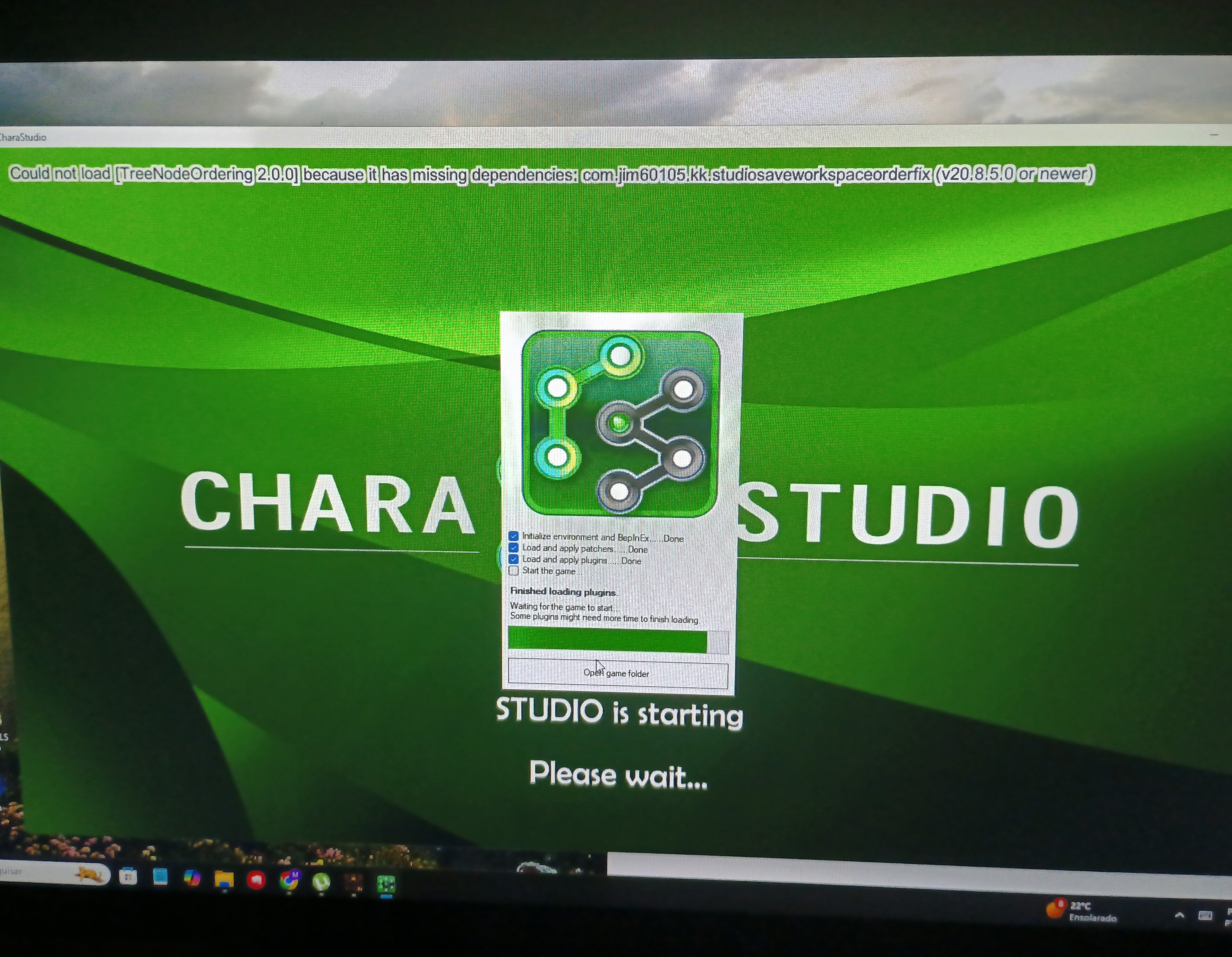
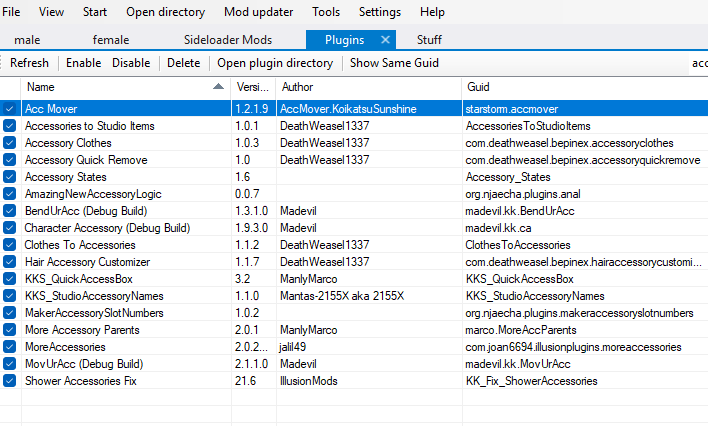
I installed the treenoordering plugin and this message appeared, what do I do?

 
M

MorumoMerry

Senior Member
Joined
Apr 6, 2025
Messages
54
Reaction score
166
Points
33
I installed the treenoordering plugin and this message appeared, what do I do?

You also need to update BepInEx and BepisPlugins.
Make sure to back up your files.
 
Catiolo Guapo

Catiolo Guapo

KK Master
Joined
Nov 23, 2024
Messages
182
Reaction score
968
Points
93
Anyone interested in sponsoring/buying scenes together?

I’d like to know if anyone here would be interested in teaming up to sponsor, buy, and share Koikatsu scenes.
The idea is simple: pool resources, split the costs fairly, and gain access to more content.

The main authors I have in mind are:
  • Cue / Gue
  • Sixpluswan
  • Poison
  • DeliruimNTR (DeliriumBear)
    and possibly
  • Releo (rleoool)
If anyone already has the latest scenes from these creators (Except Sixpluswan, since it was shared a few days ago in the main thread) or would like to collaborate in acquiring them, we could set up a fair sharing system.
What do you think? Anyone interested in forming a group for this?
 
C

Cloua

Active Member
Joined
Sep 15, 2024
Messages
83
Reaction score
53
Points
18
Anyone interested in sponsoring/buying scenes together?

I’d like to know if anyone here would be interested in teaming up to sponsor, buy, and share Koikatsu scenes.
The idea is simple: pool resources, split the costs fairly, and gain access to more content.

The main authors I have in mind are:
  • Cue / Gue
  • Sixpluswan
  • Poison
  • DeliruimNTR (DeliriumBear)
    and possibly
  • Releo (rleoool)
If anyone already has the latest scenes from these creators (Except Sixpluswan, since it was shared a few days ago in the main thread) or would like to collaborate in acquiring them, we could set up a fair sharing system.
What do you think? Anyone interested in forming a group for this?
Im in for Releo (rleoool), does he have a sane purchase policy?
Might as well add some rerely shared scene authors like
Simple Life https://simple-life.fanbox.cc/posts
KK https://www.pixiv.net/en/users/89854664
 
Last edited:
T

tytyty2999

Senior Member
Joined
Apr 3, 2025
Messages
107
Reaction score
262
Points
63
guys I keep getting error like this for all DeliriumBear SD, does anyone know how to fix? I updated to RX22 and can't use his SD anymore :cry:
Untitled.png
 
S

sososo

Member
Joined
Aug 23, 2024
Messages
31
Reaction score
26
Points
18
7y8aO4g.png


In the yurabe scene, it loads with the penis bent, what is the reason???
 
Eixa

Eixa

Veteran Member
Joined
Jun 20, 2025
Messages
75
Reaction score
502
Points
83
Does anyone know what's causing this to happen?

 
P

pinakabakod

New member
Joined
Jan 18, 2025
Messages
33
Reaction score
3
Points
8
Does anyone know whats causing the head to have a different color than the body
lgHghIC.png
 
paUnsal99

paUnsal99

Veteran Member
Joined
Mar 31, 2025
Messages
78
Reaction score
385
Points
53
U1YyQ.gif

Hey gentlemen, how do I fix this Lanzfh scene?
The kk version is RX22.
 
White_Runner

White_Runner

Senior Member
Joined
Sep 13, 2025
Messages
51
Reaction score
173
Points
33
Does anyone know whats causing the head to have a different color than the body
lgHghIC.png
If the Fix 1 didnt work, it might be an skin overlay problem:
You can clear them here:
6fvmuN7.jpeg


If you remove the skin overlay and then save/load the character and that overlay its still there, then its a texture placed on the Material Editor of the face and you need to change it.
K1wHY8r.png

Search the main texture on Material editor, find it, change it.
3r7U4Nd.png

iThv7X0.png
 
paUnsal99

paUnsal99

Veteran Member
Joined
Mar 31, 2025
Messages
78
Reaction score
385
Points
53
First: Press Backspace [<-] to get unstuck out of pov.

To move the camera inside timeline do the following:
UBvaaqO.jpeg
My question might not be very precise. I'm trying to figure out how to fix the bending of a male character's penis during penetration.
I've tried several times to figure this out but haven't been able to. So, here I am asking.
 
pouseylova6

pouseylova6

New member
Joined
Sep 21, 2025
Messages
13
Reaction score
9
Points
3
has anyone having problem like when u guys load a card on chara editor and after loading it make the game like a softlock or like the game still run but the game screen just freezing?
 
K

kazekami kageryu

Member
Joined
Sep 11, 2024
Messages
182
Reaction score
16
Points
18
how do you change Body Map in ME
 
K

kazekami kageryu

Member
Joined
Sep 11, 2024
Messages
182
Reaction score
16
Points
18


which is plugin is not needed anymore
 
paUnsal99

paUnsal99

Veteran Member
Joined
Mar 31, 2025
Messages
78
Reaction score
385
Points
53
has anyone having problem like when u guys load a card on chara editor and after loading it make the game like a softlock or like the game still run but the game screen just freezing?
The information you provided is too limited to determine if it's a hardware issue.
If it's a software issue, please provide the BepInEx console messages to see where the error is occurring.
Otherwise, it's difficult to determine the problem.
 
White_Runner

White_Runner

Senior Member
Joined
Sep 13, 2025
Messages
51
Reaction score
173
Points
33
My question might not be very precise. I'm trying to figure out how to fix the bending of a male character's penis during penetration.
I've tried several times to figure this out but haven't been able to. So, here I am asking.
Aaaah, thats BP "better penetration". Its a pain to fix since every character has different bones.
You should start by watching some tutorials on it.

Like this one:

Or this one:
 
White_Runner

White_Runner

Senior Member
Joined
Sep 13, 2025
Messages
51
Reaction score
173
Points
33
It happens when I load the character card no errors or missing mods show.
Can you send me the card, Ill try to fix it.
 
Top