[ILLUSION] Koikatu! - Questions & General Discussion Thread

Katolix

Katolix

Veteran Member
Joined
Aug 22, 2024
Messages
221
Reaction score
948
Points
93
Credits
9,690
I discovered a really interesting guide on Discord, and I wanted to share it with you,
especially with those who want to learn how to create a scene.
I asked the person who created it if I could share it, and they kindly agreed.
So here is a small basic guide on creating animations in studio mode
by AX_MMD
krnCWb2.png

qldWQs5.png


Here’s a video showing it.
Scene i did in less 1 hour with this guide.
 
AbabaMerumeru

AbabaMerumeru

Well-known Member
Joined
Jan 11, 2026
Messages
33
Reaction score
116
Points
33
Credits
1,270
Sure, here: https://gofile.io/d/7spJqi

Hopefully the issue is just isolated to my version of Koikatsu so when I do get around to updating, it will be fixed.
Unfortunatly the problem is with the headmod itself and the fix is going into timeline like you've done and then manually adjusting both for the position and the scale based on the deault values for the card.

You find them by clicking on the reset button.

Vap9ulj.png


This case is pretty easy since by hovering on the nodes we see that they're apparently all setting x/y/z to 0, so just select all, input the values and click on set.

2rwbn7H.png


For the scale you would have to proportionally adjust based on the changes being made but just setting them to default looked pretty good already.

No need to update the game though ദ്ദി◝ ⩊ ◜.ᐟ
 
Last edited:
zeidhan29

zeidhan29

KK Master
Joined
Sep 17, 2025
Messages
422
Reaction score
1,001
Points
93
Credits
10,250
I want to preface this by stating I'm a complete noob when it comes to scene editing. The only things I know are basic stuff like changing which character is being used in the scene and fixing a collider issue by disabling the dynamic collider by turning off all the affected dynamic bones.

I'm running into a strange issue where the iris seems to be overlayed on top of the faces on certain scenes. I attached 2 screenshots. The first has both the irises and the second one I was able to disable one of the irises so you can see the sclera(?) and how the iris is on top of it. Only certain characters have this issue so I suspect it's the eye overlay or something but I don't know what. Any ideas on how to fix this?

2TcKyTX.jpeg

VsGX1Zh.jpeg
I've had the same problem with some headmods, and I was able to fix it by setting the shader to alpha (Xukmi,KKUTS,Shader Forge, ETC), although I don't remember exactly which section it was, but it's a bit annoying that they come with the wrong shader by default and require modification.
 
T

taotao

Well-known Member
Joined
May 15, 2025
Messages
42
Reaction score
121
Points
33
Credits
1,435
This is one of my worries: whenever I use the Koikatsu studio for masturbation, I always end up using the same characters. I want to delete characters and scenes I don't normally use, but I keep thinking I might want to use them someday, so I can't bring myself to delete them.
Because of this, my PC's storage is getting really full.
Is there any way to deal with this?
 
The5thWorstGamerEver

The5thWorstGamerEver

Member
Joined
May 25, 2025
Messages
18
Reaction score
13
Points
3
Credits
160
Unfortunatly the problem is with the headmod itself and the fix is going into timeline like you've done and then manually adjusting both for the position and the scale based on the deault values for the card.

You find them by clicking on the reset button.

Vap9ulj.png


This case is pretty easy since by hovering on the nodes we see that they're apparently all setting x/y/z to 0, so just select all, input the values and click on set.

2rwbn7H.png


For the scale you would have to proportionally adjust based on the changes being made but just setting them to default looked pretty good already.

No need to update the game though ദ്ദി◝ ⩊ ◜.ᐟ

Thanks for the confirmation! I don't mind adjusting the interpolables if it's this small. I didn't know about the reset to get the original position, thanks for that, now I don't have to manually adjust it haha.

I've had the same problem with some headmods, and I was able to fix it by setting the shader to alpha (Xukmi,KKUTS,Shader Forge, ETC), although I don't remember exactly which section it was, but it's a bit annoying that they come with the wrong shader by default and require modification.

I tried messing around with the shader and this somewhat worked. For some characters it worked a bit better but if one does not want to mess with the timeline, this could be a decent solution although it might look weird. Thanks for the advice, I will probably mess around with this more if I run into the issue again.
 
LETHIMCOOK

LETHIMCOOK

Veteran Member
Joined
Jan 3, 2025
Messages
54
Reaction score
685
Points
83
Credits
7,015
This is one of my worries: whenever I use the Koikatsu studio for masturbation, I always end up using the same characters. I want to delete characters and scenes I don't normally use, but I keep thinking I might want to use them someday, so I can't bring myself to delete them.
Because of this, my PC's storage is getting really full.
Is there any way to deal with this?
Store it in the cloud I guess if you really need more space on your actual PC.
 
LordBubnub

LordBubnub

Senior Member
Joined
Oct 9, 2025
Messages
138
Reaction score
275
Points
63
Credits
2,927
This is one of my worries: whenever I use the Koikatsu studio for masturbation, I always end up using the same characters. I want to delete characters and scenes I don't normally use, but I keep thinking I might want to use them someday, so I can't bring myself to delete them.
Because of this, my PC's storage is getting really full.
Is there any way to deal with this?
You can have an external hard drive. It doesn't necessarily have to be in your Koikatsu game directory for a character or scene to be used. You can drag and drop a character or scene from your HDD when Koikatsu studio is open. The only exception is the mods. You have to have the mods in your game directory for it to be loaded, but characters cards and scenes can just be dropped in without the need of selecting it in game. It works just fine.
 
R

rep11

New member
Joined
Aug 26, 2024
Messages
1
Reaction score
1
Points
1
Credits
25
Character breasts behaving strangely after updating plugins. Not sure which plugin/settings is causing issues or if I'm missing something. In this scene the breasts are pressed together while in other scenes they move normally for a bit before flipping around wildly.


EDIT: It was Anisotropic Morph 0.25
 
Last edited:
zeidhan29

zeidhan29

KK Master
Joined
Sep 17, 2025
Messages
422
Reaction score
1,001
Points
93
Credits
10,250
This is one of my worries: whenever I use the Koikatsu studio for masturbation, I always end up using the same characters. I want to delete characters and scenes I don't normally use, but I keep thinking I might want to use them someday, so I can't bring myself to delete them.
Because of this, my PC's storage is getting really full.
Is there any way to deal with this?
It's not my favorite way to work, but I'd recommend saving the content you want to archive in the cloud, whether it's Drive, Mega, or another cloud service. Just make sure it's not flagged content and that you know exactly who you're sharing it with (I hate cloud services because they're so easy to take down and they don't give you an ultimatum to download everything you have there; it's easy to lose content from them, but they're ideal if you're only using them as a private library in case you run out of space).

My actual solution, and the one I use, is hard drives. They're not fast, but they're cheap. I use 1TB drives, and I'm currently at 500GB, including my own content, content shared with me, and content downloaded from other platforms. However, losing those drives due to failure or overheating is entirely your responsibility.
 
LordBubnub

LordBubnub

Senior Member
Joined
Oct 9, 2025
Messages
138
Reaction score
275
Points
63
Credits
2,927
Hi, how do I get my Koikatsu to look like the DOLLHOUSE's renders and style? I know the author uses KKUTS, but I'm not sure which settings to tweak to get it to look like how they do it. The DOLLHOUSE renders and style is something I really like, but I can't figure out what to do to make it look like it. They do share scenes and characters, but they never share the exact scene to make it look like their style.

BODY REFERENCE
T0Ih284.png

hqlXOQV.png

ZJ4vVRs.png

8kgiYsd.png

O3OSnp8.png

xsqqwWk.png

V2Nvvh1.png

dTf1hry.png
FACE REFERENCE
uZ0D9Ui.png

mPfyC3B.png

SBC2Fd4.png
LEGS & FEET REFERENCE
dBkgftG.png

dpK8O1J.png

z9O3tmp.png

cTNNz3i.png
RIM LIGHTING REFERENCE BY THE DOLLHOUSE
5FHkejD.png

Can be found here: https://dollhouse.fanbox.cc/posts/9878444


All images can be found in Kemono


lH7hlAQ.png
SfyPRvw.png

The right image uses DOLLHOUSE Scene and DOLLHOUSE Character but it's nothing like the original on the left image

The attempt above is what I tried myself, but I can never get it to look anywhere near it. Frankly speaking, I'm completely lost on where to begin because KKUTS has so many sliders that I don't know what affects what. That's also in combination with character lighting and scene effects which is another process I'm not so sure how to tweak. Any help on this will be greatly appreciated.

or if there are any tutorials that I can just read and follow, I'll also be grateful for that.

or if there's a scene that perfectly replicates it, I'm also okay with that hahaha
 
gustavo40

gustavo40

KK Master
Joined
May 17, 2025
Messages
237
Reaction score
1,124
Points
93
Credits
11,475
Hi, how do I get my Koikatsu to look like the DOLLHOUSE's renders and style? I know the author uses KKUTS, but I'm not sure which settings to tweak to get it to look like how they do it. The DOLLHOUSE renders and style is something I really like, but I can't figure out what to do to make it look like it. They do share scenes and characters, but they never share the exact scene to make it look like their style.
BODY REFERENCE

Take a look at this tutorial made by sixpluswan will give you a similar result.

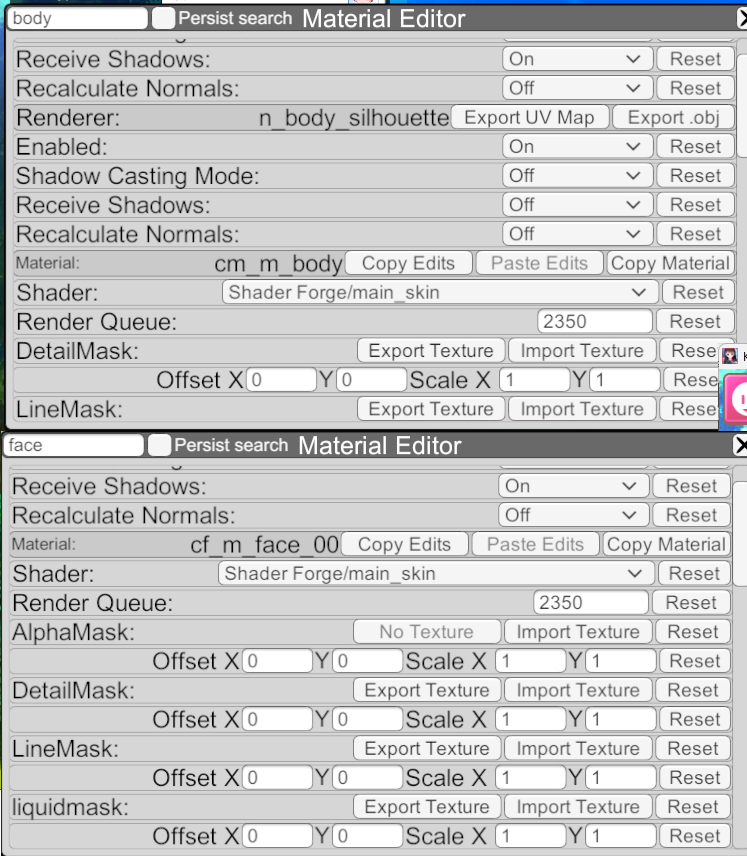
mypresetschikabody/face
 
Helblind

Helblind

Veteran Member
Joined
Aug 28, 2024
Messages
305
Reaction score
834
Points
93
Credits
8,525
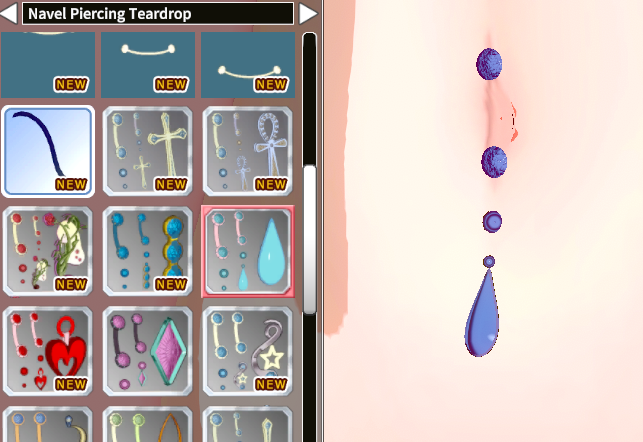
How can I secure this accessory to the navel?

Pix-Pin-2026-02-02-16-41-18.png
Ah yes, my old nemesis: the navel piercing. I tried for a while to get these specific types to work properly with animations and poses, but no luck.

The issue with this type of navel piercing is there is no parent that is the navel. It is always in relation to the parent. This is a problem because the novel moves in XYZ coordinates from the parent depending on the poses. This can be seen even in the simple bounce pose in Charamaker.

I'm no expert, any maybe someone knows better or can figure out a way to create a navel parent, but our options are thus: stay with this type of piercing and move it as need for static scenes and remove it for animations, or switch to one of the piercings that is static, like "Navel Piercing Heart & Sphere [ACP]" which is more like clothing and skinned to the navel.
 
AbabaMerumeru

AbabaMerumeru

Well-known Member
Joined
Jan 11, 2026
Messages
33
Reaction score
116
Points
33
Credits
1,270
Ah yes, my old nemesis: the navel piercing. I tried for a while to get these specific types to work properly with animations and poses, but no luck.

The issue with this type of navel piercing is there is no parent that is the navel. It is always in relation to the parent. This is a problem because the novel moves in XYZ coordinates from the parent depending on the poses. This can be seen even in the simple bounce pose in Charamaker.

I'm no expert, any maybe someone knows better or can figure out a way to create a navel parent, but our options are thus: stay with this type of piercing and move it as need for static scenes and remove it for animations, or switch to one of the piercings that is static, like "Navel Piercing Heart & Sphere [ACP]" which is more like clothing and skinned to the navel.
Have you tried using AAAAAAAAAAAA and setting it to waist_01 or spine01 (both j_ and s_)?
 
LordBubnub

LordBubnub

Senior Member
Joined
Oct 9, 2025
Messages
138
Reaction score
275
Points
63
Credits
2,927
Take a look at this tutorial made by sixpluswan will give you a similar result.

mypresetschikabody/face
Oh nice thank you! I didn't know sixpluswan made a KKUTS guide. I'll give it a try. Thanks again and I appreciate you taking the time and trying it out yourself!

EDIT:
If anyone knows if there are more KKUTS guides out there, I'd love to have them as well. Maybe if I have enough guides, I can mash the knowledge together then average it out to get the result I want.
 
Last edited:
Top