[ILLUSION] Koikatu! - Questions & General Discussion Thread

KK DONALD'S

KK DONALD'S

KK Master
Joined
Jul 26, 2025
Messages
1,353
Reaction score
2,705
Points
113
Credits
28,410
New patch new problem, just updated the HF patch and again the Bodytype problem came up, all my female character are on innie/clit body type but u load it on scene, the body type remains unchanged but the male PP doesnt interact it like its a non BP body, i have to manually change the female body type for every character i swap
 
LordBubnub

LordBubnub

Veteran Member
Joined
Oct 9, 2025
Messages
254
Reaction score
734
Points
93
Credits
8,302
Aight, I'm stuck. I have no idea what I'm doing, but I don't want to give up. I'm not sure what else to change. The guide that sixswanplus made at least taught me that there's something such as a Shader Management Tool to easily swap shaders. I previously doing it one by one so that's a plus in my book. But in the end, it made it look like sixswanplus instead of the DOLLHOUSE. 😅

0KMI0DJ.png
ekIT8VH.png

With the chika sample that gustavo40 gave, I tried swapping it to the character and adjusting the settings. It's somewhat getting there, but now I'm stuck on what to change. Even tweaking some sliders in KKUTS don't do anything, so am I missing something with what I'm adjusting?

YJDC1PW.png
i6OXEGX.png

So I tried experimenting with scene effects and shadows, but it's not close to the color of the DOLLHOUSE anymore. Something about the scene makes the skin color so different to what I'm trying to achieve. Am I missing a normalmap, detailmask or something? Does it have something to do with the base scene settings or character lighting? So I'm basically stuck here.


And just to clarify, if it's grayed out, does that mean nothing happens or something?

I'll provide the scene and characters below with what I'm working with.

I'm not giving up until I get it as close as I possibly can, so any help on this will be appreciated! Thanks!
This creator has some tutorials about kkuts, maybe that will help.

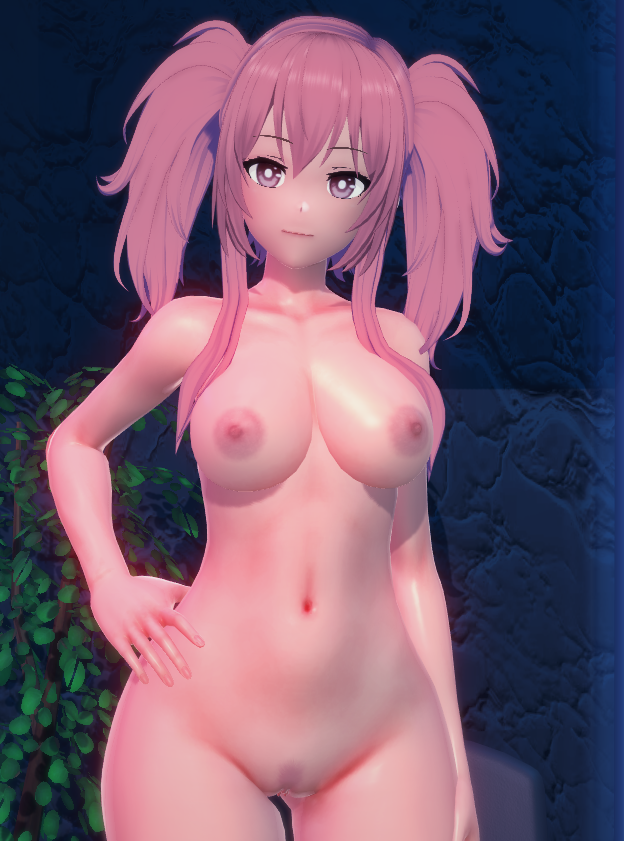


I understand almost nothing about how kkuts works, maybe someone here on the forum knows, I'll share some presets I made trying to replicate it.

random video test
I believe what you should be messing around with is matcap. That's what gives the shine/glossy effect.

I don't use KKUTS so I don't have many lying around. I tried a few but they dont look much like the one dollhouse uses.

45jiW1a.png


Also, grayed out just means it's not a default value.
Check if you're using either AccStateSync, AccessoryStates or ANAL. They are used to dynamically toggle accessories.
Aight, I'm back with an update.

Rf8Lewe.png
Rh1g9ol.png

Left: DOLLHOUSE / Right: Mine

This is the closest I've ever been in replicating the DOLLHOUSE's style. First off I was misled to thinking the DOLLHOUSE uses only KKUTS. The author uses a combination of KKUTS for certain parts and Shader Forge/main_skin but the missing factor was the bloom in scene settings to get the color correction.

rXDHec4.png

Bloom settings I use to get the color correction (not perfect yet)

These are the results of what I have so far. It's not completely there yet, but it's really getting there.

Left: DOLLHOUSE / Right: Mine

zMhNDzN.png
EziiQHf.png

l4jYTA0.png
etOAp9h.png

r5DNrQd.png
fGIG1O6.png

Now I'm hoping there someone here that can help me with skin textures. I think it's normalmap? I'm not sure. The one that reflects and looks like the DOLLHOUSE. If you look really closely at the image below, the skin has a nice texture when reflected with the light and it's a nice skin texture in general. I'm trying to figure out settings needed to match the reflection of what the DOLLHOUSE uses.

LhxzDKm.png

S3RZpBQ.png

sexy skin texture
This is currently where I'm at. So hopefully a Koikatsu hero can help me out with this. I'll include the scene that I'm working with. I'm so close I don't want to be stuck with just a skin texture and reflection correction.

Scene


Special Mention

I gotta mention this one pixiv artist called PerusingTheSite. Just want to mention him since I saw his body templates and asked if he could helped me out. He worked on this card that I have now with the overlays I was missing that matched with what the DOLLHOUSE uses, but he said he couldn't match the skin texture or the reflection. But after he did this, that was when I realized that he nuked his pixiv after he helped me. I couldn't save all his stuff before he left, but I want to add it here since someone might find it useful.

PerusingTheSite Body Templates

ASn08RW.png

6KXhz1v.png

YGeFsEB.png
 
M

mudaaa1

New member
Joined
Sep 27, 2025
Messages
9
Reaction score
0
Points
1
Credits
395
The image is from a scene in DoriDoriko, but there's a problem where the eyeliner on the girl in the center isn't displaying correctly. Does anyone know how to fix this?

 
K

KoiKonnoisseur

Member
Joined
Aug 3, 2025
Messages
29
Reaction score
13
Points
3
Credits
570
Does anyone know how to fix misalignments like this? (Scene is from AnnaAnon)
Better scaling says to check folders and reset scale to 1 but i've tried that on pretty much everything and still can't get the intended position.
And if I disable BS it ruins the entire scene. I heard that some other plugins can cause weird interactions with BS but i'm not too sure which one would.
042SIQV.jpeg

Scene should look like this below.
yEO5He1.png

(EDIT: Turns out disabling BP Collider in Status fixed it.)
 
Last edited:
M

Morgion

Member
Joined
Jul 14, 2025
Messages
14
Reaction score
20
Points
3
Credits
360
Anyone know how I fix the issue where some characters accessories refuse to not sit on the floor? Even when I manually move them to their proper spot, and save the outfit, and the character, as soon as I load it up again, boom, they're on the floor. I've searched for this issue and I already got kk_jetpack.dll and yes I put it in the bepinex->plugins folder
I also got kk_characteraccessory.dll

But it keeps doing it *sobs*
 
cesarnator

cesarnator

Veteran Member
Joined
May 13, 2025
Messages
180
Reaction score
730
Points
93
Credits
7,885
Anyone know how I fix the issue where some characters accessories refuse to not sit on the floor? Even when I manually move them to their proper spot, and save the outfit, and the character, as soon as I load it up again, boom, they're on the floor. I've searched for this issue and I already got kk_jetpack.dll and yes I put it in the bepinex->plugins folder
I also got kk_characteraccessory.dll

But it keeps doing it *sobs*
did you have the ParentSwitch plugin?
 
M

Morgion

Member
Joined
Jul 14, 2025
Messages
14
Reaction score
20
Points
3
Credits
360
did you have the ParentSwitch plugin?
I don't think so? in my plugins folder if I search 'parent', I only get KK_accessory_parents.dll and .pdb.

I google parentswitch plugin parentswitch.dll, parentswitch koikatsu and All I find are generic how to install plugins pages and such, do you know the exact name?

Edit:
I also have KK_moreaccesoryParents.dll
Doesn't show up when I search for parents but I apparently already have it
 
cesarnator

cesarnator

Veteran Member
Joined
May 13, 2025
Messages
180
Reaction score
730
Points
93
Credits
7,885
I don't think so? in my plugins folder if I search 'parent', I only get KK_accessory_parents.dll and .pdb.

I google parentswitch plugin parentswitch.dll, parentswitch koikatsu and All I find are generic how to install plugins pages and such, do you know the exact name?

Edit:
I also have KK_moreaccesoryParents.dll
Doesn't show up when I search for parents but I apparently already have it
its KK_ParentSwitch
 
Top
これは閲覧専用の自動翻訳ページです。返信・検索・ログインなどの操作は、オリジナルの英語版サイトへ移動してください。 英語版で開く (Open in English) ×