
one_hand
Member
I appreciate it
😸

I appreciate it

 www.pixiv.net
Does anyone have this scene from YOurWaifu NTR-ed?
https://www.pixiv.net/artworks/127817435

 gofile.io
  www.pixiv.net www.pixiv.net
Do you have the one that was for creator cards? There was a scene and character one
 drive.google.com
  www.pixiv.net
 Normally what i do is check rather :
how to fix the boobs ? i check kkpe for bust and bones all scale to 1

Hello, send me the SD, I'll see what the reason might be.It is a timeline. When it is paused, the hand position is normal. After playback, the hand movement is no longer in the original position.
It seems like there is something wrong with some plugin!!!

 gofile.io
 Probably this. Free SDHello, send me the SD, I'll see what the reason might be.
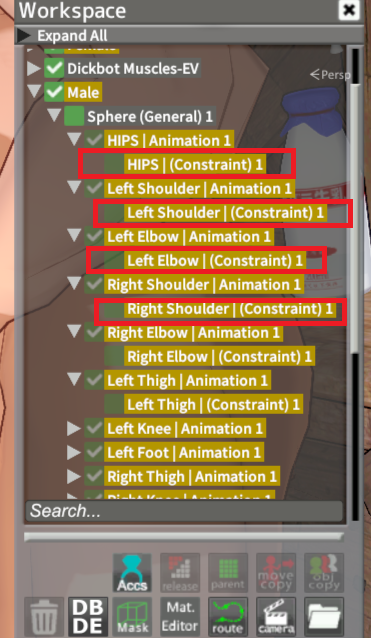
www.pixiv.net This happens when your character does not match the body proportions and height of the original character. When replacing a character, the nodes match the original parameters and if the character you replaced does not match the positioning, you have such an anomaly. The easiest way is to manually edit the position of the nodes. In the folders for each character there are IK nodes with the name of the body parts, you only need to move the folders with the note " | (Constraint)" The main bones of the character are attached to these nodes.This procedure must be done with all the nodes in the main IK folder.
Gofile - Cloud Storage Made Simple
Secure, fast and free cloud storage solution. Upload and share files instantly.
I have a question
When I change to a female character like this, it doesn't act like the original male position. How do I fix it?
I'm waiting for the answers from the experts :c
The male character in the scene is kinda tall, the female you're using probably isn't tall enough for it to fit well. Btw could you share that Erina?
Gofile - Cloud Storage Made Simple
Secure, fast and free cloud storage solution. Upload and share files instantly.
I have a question
When I change to a female character like this, it doesn't act like the original male position. How do I fix it?
I'm waiting for the answers from the experts :c
Yes, I knew it was YuraBe, this scene works fine, I just wanted to make sure it wasn't an already edited scene with broken nodes that caused problems.Probably this. Free SD
[R-18]A Night with Madoka
Female Chara : https://www.pixiv.net/en/artworks/94591683 Video (No sound) : https://mega.nz/file/Bol1CIbA#iZQmNQbBDuCoZfoOAcuuuNo8pkEe04

The male character in the scene is kinda tall, the female you're using probably isn't tall enough for it to fit well. Btw could you share that Erina?
gofile.io  www.pixiv.net
  gofile.io www.pixiv.net
  gofile.io
 First of all, thank you so much for your long and thoughtful answer. If height is the issue, would it be easier if you matched the height of the original character?This happens when your character does not match the body proportions and height of the original character. When replacing a character, the nodes match the original parameters and if the character you replaced does not match the positioning, you have such an anomaly. The easiest way is to manually edit the position of the nodes. In the folders for each character there are IK nodes with the name of the body parts, you only need to move the folders with the note " | (Constraint)" The main bones of the character are attached to these nodes.This procedure must be done with all the nodes in the main IK folder.
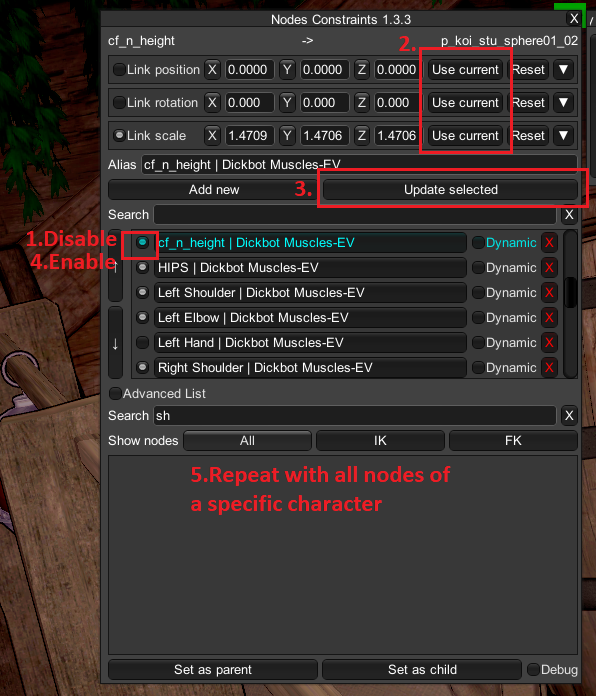
There is another method. You need to open NodesConstain and find the nodes of the male character, then you need to replace the character and disable all the nodes associated with him.
Then make an adjustment using the "Use current" key, then click "Update selected" and reactivate the node.
Keep in mind that if you have a serious difference in height, then these methods will not help you, the character will take the necessary pose, but it will be greatly distorted. Try not to use a small or very large height.

First of all, thank you so much for your long and thoughtful answer. If height is the issue, would it be easier if you matched the height of the original character?
And I have one more question for you, Master.
When you overwrite a female character, it sometimes changes like this.
What's the problem?
Sorry I'm a newbie. Where can I find the plugin you mentioned? Master
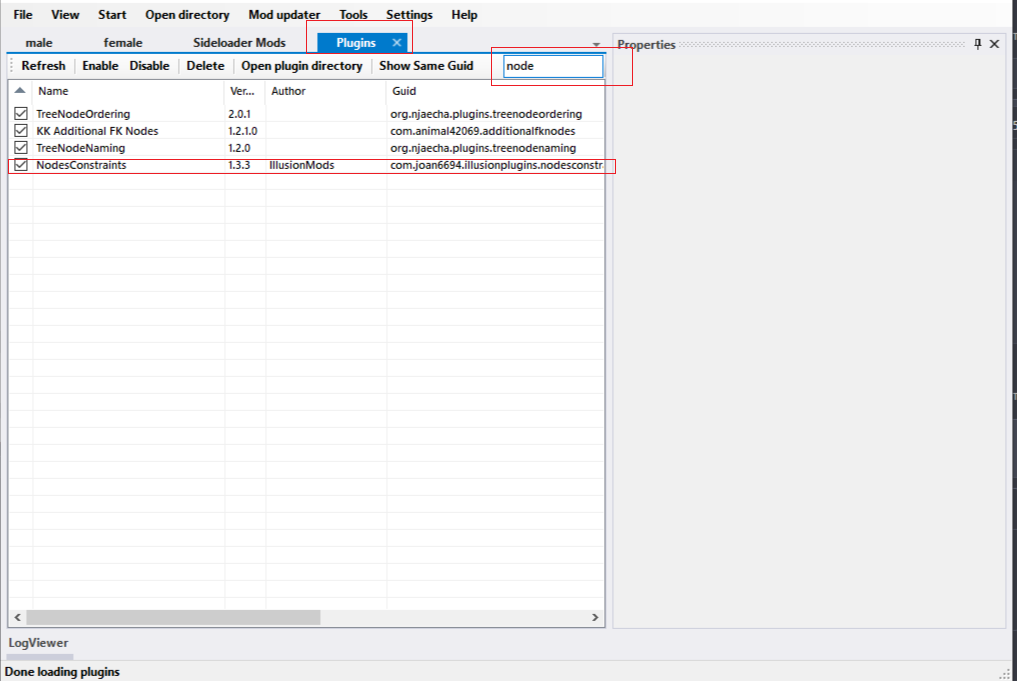
Damn it, what is this?😂 But seriously, most of the problems are related to nodes, check NodesConstain , and I would like to clarify with you what version of this plugin you are using? It's just that in the latest version after 1.4 there is a bug that breaks nodes.
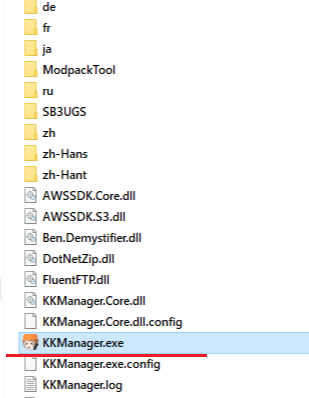
Plugins can be viewed in KKManager which is located in the game directory. folder [UTILITY] KKManagerSorry I'm a newbie. Where can I find the plugin you mentioned? Master
Maybe u can fix with pose -> basic pose -> T-poseFirst of all, thank you so much for your long and thoughtful answer. If height is the issue, would it be easier if you matched the height of the original character?
And I have one more question for you, Master.
When you overwrite a female character, it sometimes changes like this.
What's the problem?
1.32version then now node problemPlugins can be viewed in KKManager which is located in the game directory. folder [UTILITY] KKManager
And also find out which plugins work and which don’t. Data on the version of the plugins is also present.
Maybe u can fix with pose -> basic pose -> T-pose


pose 1 bro?
Pose 1 is not fixed even if you press it.
If not here, I don't know where


?
how to fix the boobs ? i check kkpe for bust and bones all scale to 1
Shortcut (thank Mimicozzz for this)Can you share this scene for me?

Shift + T ?Is there a way to play timeline videos without opening the timeline window?
alt+t This shortcut does not work.
There's a way to change the height of character but it required you to install VNGE with scene player in it. It might came from another factor such as uncensor type , NC , collider , etc... You get the point.First of all, thank you so much for your long and thoughtful answer. If height is the issue, would it be easier if you matched the height of the original character?


