[ILLUSION] Koikatu! - Card Sharing Request Thread 2.0 (Restart)

Humparagus

Humparagus

Veteran Member
Joined
May 8, 2025
Messages
145
Reaction score
510
Points
93
Credits
5,550
https://www.pixiv.net/en/artworks/113632108 anyone have this card? from envenenad0
I've looked in other envenenad0 archives but this card is always missing
Unless they sell them again in the future or the few people that bought the limited supply share them, they'll probably stay missing along with their other cards they sold a limited amount of
 
lulwwhatever

lulwwhatever

New member
Joined
Mar 7, 2026
Messages
6
Reaction score
6
Points
3
Credits
165
hopefully someone else will I dont want to deal with upload shit for a bit
odiMukf.png
 
T8s

T8s

Member
Joined
Jan 17, 2026
Messages
21
Reaction score
22
Points
3
Credits
455

Anyone have this upiuu card? I have not seen this posted once on this forum unless I am a dumbass.
I am pretty sure I have everything except for her.
do you share your collection?
 
housebreak99

housebreak99

Well-known Member
Joined
Jun 10, 2025
Messages
12
Reaction score
80
Points
13
Credits
1,235
Something- something about ●•●•⚉/lor/OoOoO
Don't have link to his fanbox/patreon meant its not available. You gotta be his butt buddies or making a pact with a jinn if you want those unreleased chars
 
Last edited:
prd

prd

Well-known Member
Joined
Dec 28, 2025
Messages
53
Reaction score
159
Points
33
Credits
1,930
Hey what do I need to make the socks appear in this card by Sankuku?
u have 2 option:
1. use stocking, with it u can put 2 different texture since it wont mirror left and right side.
or
2. use single left side sock on clothes tab and single right side sock on accessories slot, for this setup u need mod that contain single left and right sock and a plugin that allow to put clothes on accessories slot.
as for the mod itself "[nashi] Socks v2.0" have this option


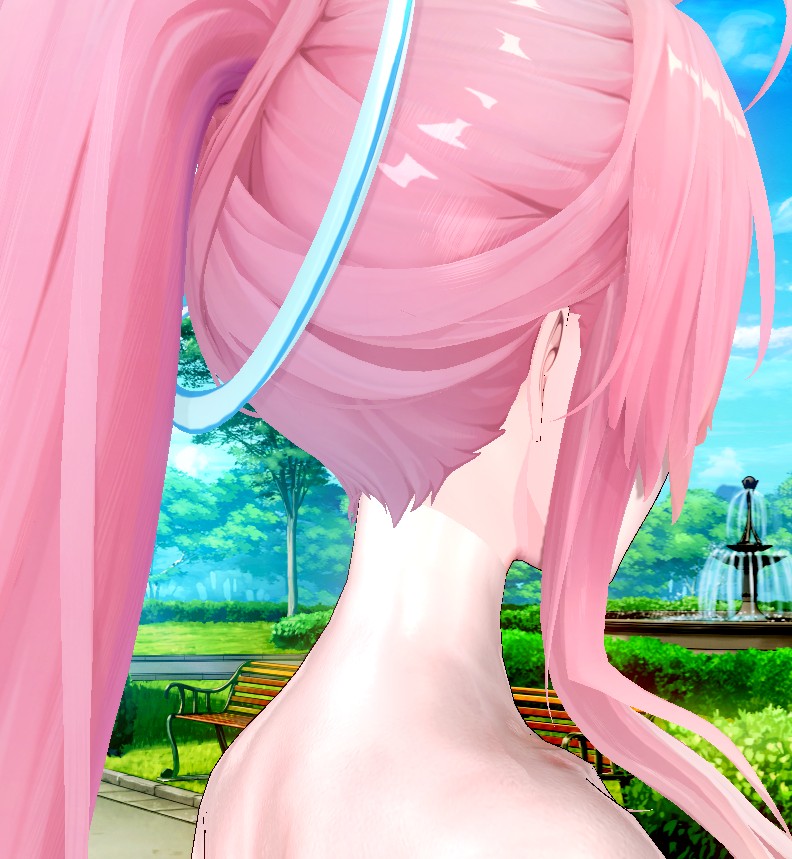
Why is there a noticeable color difference on the neck? Does anyone know how to solve this?

グラフ's Aemeath https://www.pixiv.net/artworks/141089563

like previously mention its a common problem with headmod in general, u can
use body overlay to make a color gradation in the neck area to make a seamless connection.

if the color difference are to big, either match the body color to the head which is usually easier
or make the head color match the body color although u will need to edit the head texture with editing software.

i mostly use coreldraw to add transparent skin color on top of the face texture so i can match the body color without losing its original features like makeup, lip etc on the original head texture.
 
Last edited:
P

Paladin Synth

New member
Joined
Jan 23, 2026
Messages
15
Reaction score
5
Points
3
Credits
160
Hi guys, I mix and matched some skimpy armor outfits and just slapped them with a simple golden texture and it looked pretty nice, sharing it here in case somebody else also likes these kinds of outfits : D
Outfit Link : https://gofile.io/d/y4grBD
JpnNdE5.jpeg

5GPAKmJ.jpeg
This skimpy armor reminds me of certain eternal dread games, now I can't help but keep imaging poor poor symphoria gets captured by the goblins...

Now speaking of goblins does anyone have good goblin cards?
 
9

97erri

KK Master
Joined
Aug 5, 2025
Messages
354
Reaction score
1,006
Points
93
Credits
10,555
This skimpy armor reminds me of certain eternal dread games, now I can't help but keep imaging poor poor symphoria gets captured by the goblins...

Now speaking of goblins does anyone have good goblin cards?
do you have eternal dread 1? I cant find it on f95 or other websites.
 
C

chimen92

New member
Joined
May 18, 2025
Messages
12
Reaction score
9
Points
3
Credits
100
if any of you can get one (or even both?) of those outfits, it would be nice.

i'm also leaving something here, perhaps you'll find them useful?...
Do you have this mod by akiwax? Please share me, i can't find it. Thank you very much
 
Eudoxus

Eudoxus

KK Master
Joined
Aug 24, 2025
Messages
285
Reaction score
2,423
Points
93
Credits
25,035
Reuploaded Violetv3 collection, complete and up to 2026-02-18

Pleaselog into download


Sesame Street Vampire GIF by Muppet Wiki

Pleaselog into download


if theres anyone thats dissatisfied with makisu's body proportions like me I quickly made an edit of their marine, giving her accurate height and fixing the wonky proportions. I'll upload in case anyone wants. Big fat ass is untouched of course
ZIubzE2.png


Same here, what got me into making cards was having to modify card bodies for them to be more to my tastes, and by my tastes I mean whatever Shayo's got going in their doujins

vbQxP8C.png


QVB58Pk.png
 
P

Paladin Synth

New member
Joined
Jan 23, 2026
Messages
15
Reaction score
5
Points
3
Credits
160
9

97erri

KK Master
Joined
Aug 5, 2025
Messages
354
Reaction score
1,006
Points
93
Credits
10,555
https://mega.nz/file/zTREFT7T#VTALrtV9g8-kG0Q8McE7ON82TdB2gYJ4Uw0sZLAlGVc

Mega link of ED1.

Had a fun time with the series but now after I saw how well made recent gacha game's female models are I will likely only play those again if I can manage to find a mod to replace all female models in the game with azur promilia's models.
Thank you so much saved me 10 dollars there.

Trying to play any new gacha games with these 10/10 models is so hard to not get a erection.
 
PitSmeller

PitSmeller

Senior Member
Joined
Aug 18, 2025
Messages
110
Reaction score
203
Points
43
Credits
2,405
Reuploaded Violetv3 collection, complete and up to 2026-02-18

Pleaselog into download


Sesame Street Vampire GIF by Muppet Wiki

Pleaselog into download


Same here, what got me into making cards was having to modify card bodies for them to be more to my tastes, and by my tastes I mean whatever Shayo's got going in their doujins

vbQxP8C.png


QVB58Pk.png
Aye big dawg, would you mind sharing that Kafcake card?

zJQKlf4.png
 
I

ImtryingAlr

New member
Joined
Sep 13, 2025
Messages
12
Reaction score
6
Points
3
Credits
180
Does anybody have the previous Ettole bleach video to download? He deleted the video on twitter and now I don’t have a way to view it
 
Splooderr

Splooderr

KK Master
Joined
Aug 23, 2024
Messages
266
Reaction score
1,925
Points
93
Credits
20,045
Peppеr

Peppеr

Well-known Member
Joined
May 8, 2025
Messages
6
Reaction score
114
Points
28
Credits
1,590
Does anyone still have the YOurWaifuNTR-ed scene archive?
Pepper's scene archive doesn't work anymore
Heeey~!! What exactly doesn't work? Can you describe your issue? YOurWaifuNTR-ed is online and functional on my end without any errors! (*≧◡≦) Download servers were recently updated! Domains changed too~ no longer using flashbang & trashbytes~! Currently domains are fafda & pastabillites for file downloads~ and "internal server error" isn’t happening anymore, yay~ I’m sure that was suuuper annoying for many~! Are you maybe getting a blank screen-like issue… hmm~?? ♡

Does anyone know how the penis is kept fixed in position in scenes by Punyuz? I loaded their scene without any error messages. Their scene also doesn’t use the J694 dynamic bone collider, which would normally prevent the penis from clipping through the body. Am I missing some additional mod or plugin?

Scenes by Nyanify also don’t use the J694 dynamic bone collider, yet the male’s penis stays perfectly positioned inside the female’s vagina.
The J694 dynamic bone collider is used for "items" (workspace objects) the penis isn't part of the male but a studio object! Personally I find node constraints to be wayyy better~!! Preventing hair and accessories from becoming annoyingly sticky... teehee~ Nyanify's scenes use BP for the penis to target the vagina, which is part of both character models, they're not items!! ♡ Eeee~ so handy, right?!
 
P

Paladin Synth

New member
Joined
Jan 23, 2026
Messages
15
Reaction score
5
Points
3
Credits
160
Kyonko - Sushang HI3

I always liked Kyonko's since they did custom texture to make the hair detailed + good body and face overlays, also generally good body proportion to begin with
Thanks for the card but I literally spent 2 hours trying to find her...somehow she has a weird name so searching {li,su, shang} none of them worked and I had to dig through my 2000 cards to find her.


Fear the sumo champion li sushang🤣🤣🤣
 
AbabaMerumeru

AbabaMerumeru

Veteran Member
Joined
Jan 11, 2026
Messages
64
Reaction score
507
Points
83
Credits
5,455
I originally intended to just answer your questions but I ended up writing a whole ass guide explaining how I approach making character cards so I'll briefly address your first question here and you can read the guide below for more in-depth explanations.

By copying the slider values of the reference cards into my edited one, for example, I like the eyes of card A, and the head shape of card B, so I copy the slider values of the eyes of card A and the slider values of the head of card B and put them into one. The result won't look good if you blindly copy the sliders however, you'll inevitable have to make adjustments from observation and that's where you make use of your other references. A good example of this is my version B of the Mekami Shifty card, I copied the values of the head shape from Upiuu's Mast card because I felt like it resembled the source material very closely, and once I did that I adjusted everything else accordingly.

An important lesson you learn when studying figure drawing is to work from the biggest shapes down to the smallest, starting with the general shape of the head before moving on to the features of the face within it.

In Koikatsu this means starting with the head scale X, Y, and Z sliders, then continuing with the ears, jaw and cheeks sliders, I know that the sheer amount of sliders can be daunting but keep in mind that you can always go back and fine tune them, at this point of the process you're not supposed to be concerned with the details of the face, we're trying to get a satisfying head shape to work on as a foundation, think of it as sculpting a head with clay, you don't start with the smaller features of the face like the eyes or the nose.
Since your references are also 3d models this part shouldn't be that complicated, just make sure to angle the head of your model to match the same angles from your references and switch between them from time to time to get as close as possible. If you have a card that has a similar shape of the head you can copy the slider values from it to save yourself some time and work from there, the card doesn't have to be exactly the same as the one you are trying to match, it could even be from a completely different character as long as it has a head shape that you feel can help you get closer to the final result, otherwise you can make the head from scratch by observation, just take your time and work on the sliders one by one.

Once you're satisfied with the head shape you should start laying out the face by roughly measuring where each feature sits in the model you're trying to match, the sliders I move at this point are eye, eyebrow, nose, and mouth vertical position, as well as eye height, width, and spacing, don't concern yourself with the shape or details of the features just yet, we are laying out where each feature sits, not their specific form. Having basic anatomical knowledge helps; the eyes sit roughly at the middle point between the top of the head and the tip of the chin and are about one eye apart in width, the base of the nose sits at the middle point from the tip of the chin and the center line of the eyes, etc. I'm aware that waifus do not look like real humans most of the time but in my opinion these are still good guidelines if you find yourself having trouble placing the features of the face, and if you look at my Chun-Li card and P.Jackson's Mai these rules still apply despite how stylistically different they are from real life.
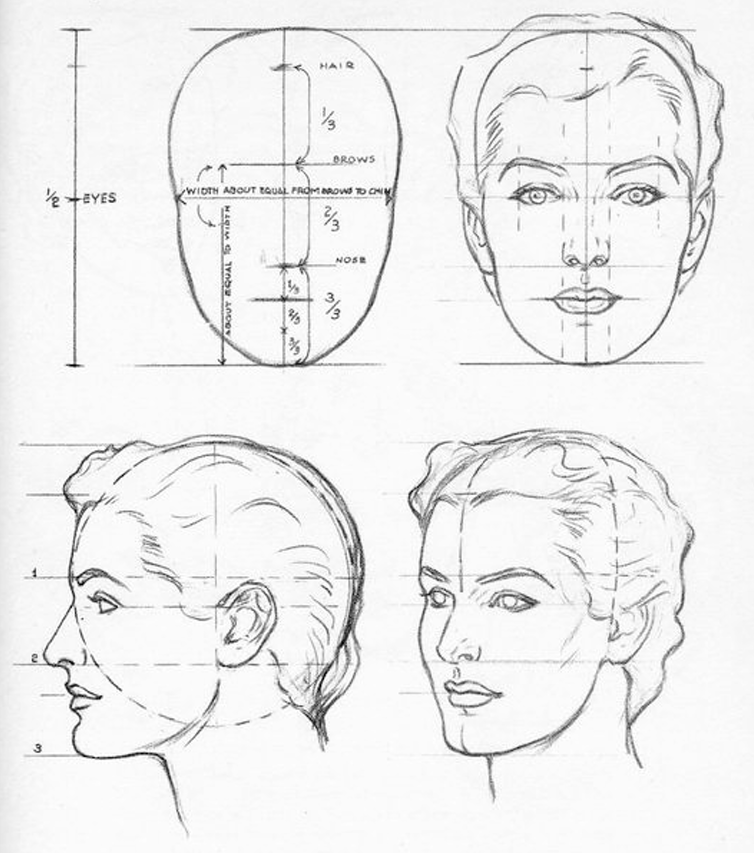

From Andrew Loomis' Drawing the Head and Hands

Lastly we concern ourselves with the features of the face as well as other character specific details, I usually start with the easier ones like mouth width and angle, eyebrow shape and spacing, and leave the eyes for last since they tend be the trickiest to get right, first with the eye rotation slider to get a basic idea of the shape, then the eye lid sliders, inner and outer eye corner height sliders and finally the upper and lower eyelash sliders, I personally don't change the eyeball scale sliders at all since I find the previous options robust enough to get the desired shape but feel free to mess around with them if you wish, additionally don't forget to play around with the iris shape and vertical position sliders as well, since a slight adjustment of the iris can make or break the appearance of the eye from my experience. Regarding character specific details, these are the unique facial features of the character you're trying to match, for example, going back to my Chun-Li card, it was important to get the eyebrows and red makeup right since these are iconic details of the character to me, this just comes down to looking at the list of face feature types in your game and find the ones that look the closest to your reference (or you could draw them in photoshop or any other raster graphics software but this guide is already long enough so I won't cover material editor and overlay stuff here lol). Ask yourself what are the details of the card you're trying to match that stand out the most, it could be the makeup, eye color, eyebrow shape, a mole, etc.

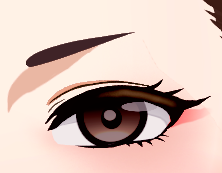
Chun-Li 3rd Strike portrait on the left, my card on the right

To summarize, start with the largest shapes first (the shape of the head, jaw, and chin),then lay out where each feature of the face sits inside the head by measuring your reference (eye, mouth, and nose vertical position and spacing),lastly work on the smallest details like eye and iris shapes and don't forget to get the character defining features like makeup or eye color. If you give yourself some structure in your work process you won't get overwhelmed by the vast sea of sliders that the character maker has.

Some closing thoughts
From personal experience it's very easy to get tunnel vision and get frustrated from not getting a specific detail right, I've read of artists dealing with this by looking at their work through a mirror, flipping their canvas upside down or looking at their work from a really far away distance, I find these pretty useful when I'm stuck but if they don't work for you just take a small break and you'll be just fine.
I also recommend saving your character multiple times as you work on it because if you feel like you messed something up and don't remember which sliders you moved you can always go back to a previous version of your character and work from there, for example I saved the Mekami Shifty card I posted like 7 times, each with a slightly different face, because I couldn't decide which one to keep working on, and even after I posted it I made another version lol, make as many copies as you can and don't be afraid to mess around with them.

I hope this guide helps you or anyone else trying to make character cards, thanks for reading till the end.
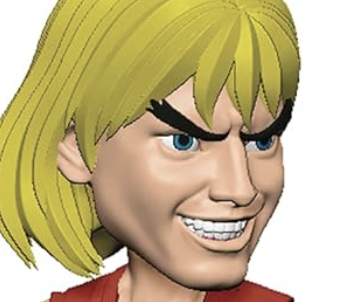


maybe

Since we are talking about card making, I think it's a good idea to quote an old post of mine.

It can really be a pain hahahah

As a bonus, Imma show you somehing I don't know many people know about.

If you ever messed around with the joint bones ( j_ ) for the legs/calves, you may have noticed that when the characters bend the knees they levitate off the ground even if you increase them proportionally. (I recommend only incrementing joint bones this way as the proportions can get wacky depending on the axis of the body part, use n_/s_ or something else if you intend on independently editing x/y/z scales)

The fix I found was to scale down/up the j_hips bone depending if you decreased/increased j_thigh00 or/and j_leg01 and then scale the character up/down using the n_height bone.

For example this is what did it for me for this character:

HF9OOcA.png


mi22yXf.png


It will not be perfect like if you had not edited those bones in the first place but it can get almost negligible.

Also, I recommend doing this in studio so you can have two copies of the same character overlaping and get the same height you intended!

Hope it helps! ദ്ദി(˵ •̀ ᴗ - ˵ ) ✧
 
D

Dogster456

New member
Joined
Aug 18, 2025
Messages
3
Reaction score
2
Points
3
Credits
30
Heeey~!! What exactly doesn't work? Can you describe your issue? YOurWaifuNTR-ed is online and functional on my end without any errors! (*≧◡≦) Download servers were recently updated! Domains changed too~ no longer using flashbang & trashbytes~! Currently domains are fafda & pastabillites for file downloads~ and "internal server error" isn’t happening anymore, yay~ I’m sure that was suuuper annoying for many~! Are you maybe getting a blank screen-like issue… hmm~?? ♡


The J694 dynamic bone collider is used for "items" (workspace objects) the penis isn't part of the male but a studio object! Personally I find node constraints to be wayyy better~!! Preventing hair and accessories from becoming annoyingly sticky... teehee~ Nyanify's scenes use BP for the penis to target the vagina, which is part of both character models, they're not items!! ♡ Eeee~ so handy, right?!
Thanks! I couldn't get it through the main link but was able to download it through the mirror links
 
KK DONALD'S

KK DONALD'S

KK Master
Joined
Jul 26, 2025
Messages
1,304
Reaction score
2,634
Points
113
Credits
27,595
Heeey~!! What exactly doesn't work? Can you describe your issue? YOurWaifuNTR-ed is online and functional on my end without any errors! (*≧◡≦) Download servers were recently updated! Domains changed too~ no longer using flashbang & trashbytes~! Currently domains are fafda & pastabillites for file downloads~ and "internal server error" isn’t happening anymore, yay~ I’m sure that was suuuper annoying for many~! Are you maybe getting a blank screen-like issue… hmm~?? ♡
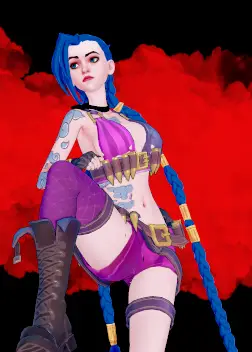

The J694 dynamic bone collider is used for "items" (workspace objects) the penis isn't part of the male but a studio object! Personally I find node constraints to be wayyy better~!! Preventing hair and accessories from becoming annoyingly sticky... teehee~ Nyanify's scenes use BP for the penis to target the vagina, which is part of both character models, they're not items!! ♡ Eeee~ so handy, right?!
R u the real EROS or just a pirate like us
 
lulwwhatever

lulwwhatever

New member
Joined
Mar 7, 2026
Messages
6
Reaction score
6
Points
3
Credits
165
Reuploaded Violetv3 collection, complete and up to 2026-02-18

Pleaselog into download


Sesame Street Vampire GIF by Muppet Wiki

Pleaselog into download


Same here, what got me into making cards was having to modify card bodies for them to be more to my tastes, and by my tastes I mean whatever Shayo's got going in their doujins

vbQxP8C.png


QVB58Pk.png
What a チャド this guy, thank you kind sir


Similar threads

Top
これは閲覧専用の自動翻訳ページです。返信・検索・ログインなどの操作は、オリジナルの英語版サイトへ移動してください。 英語版で開く (Open in English) ×